

- Local time
- 12:41 AM
- Posts
- 5,799
- Location
- Hafnarfjörður IS
- OS
- Windows XP,11 Linux Fedora Rawhide pre-release 45
Hi folks
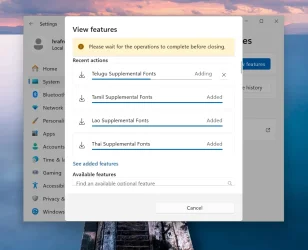
Seems on typical Windows 11 - if you want to add Optional features - it works fine if you select 6 or less. After 6 the screen doesn't show any more being added --so you have to cancel and then add the ones not installed (6 at a time !!)..
I don't know if there's a registry setting that states "Max number" but it seems to be 6. You can then continue to install more again after each 6. I hit the limit because I was trying to install the optional Fonts such as Chinese, Pan European, Korean etc. and there's loads of them !!. These fonts are often useful if perusing some Asian etc websites or if watching some Korean etc movies and you need subtitles to appear in "Readable forms" etc !!!!.
(Adding Optional Features looks like this :)
cheers
jimbo
Seems on typical Windows 11 - if you want to add Optional features - it works fine if you select 6 or less. After 6 the screen doesn't show any more being added --so you have to cancel and then add the ones not installed (6 at a time !!)..
I don't know if there's a registry setting that states "Max number" but it seems to be 6. You can then continue to install more again after each 6. I hit the limit because I was trying to install the optional Fonts such as Chinese, Pan European, Korean etc. and there's loads of them !!. These fonts are often useful if perusing some Asian etc websites or if watching some Korean etc movies and you need subtitles to appear in "Readable forms" etc !!!!.
(Adding Optional Features looks like this :)
cheers
jimbo
Last edited:
My Computer
At a glance
Windows XP,11 Linux Fedora Rawhide pre-releas...2 X Intel i7
- OS
- Windows XP,11 Linux Fedora Rawhide pre-release 45
- Computer type
- PC/Desktop
- CPU
- 2 X Intel i7
- Screen Resolution
- 4KUHD X 2





