Solved How to delete folders under C:\Windows\WinSxS\Temp\InFlight


Have not seen that error code before, What happend if you run the command again? Even now you have emptyed the folder. However if it does work a second attempt, i might have an idea where the issue originates from.

I ran it multiple times with the same result. Even now with the InFlight folder completely empty.
1750815168162.webp

1750815478212.webp
 

My Computers My Computers

  • At a glance

    Win 11 Pro 25H2 26200.8737Intel® Core™ i7-14700KG.SKILL Ripjaws S5 Series 64GB (2 x 32GB) DDR5ASUS GeForce RTX 4070 Super 12GB
    OS
    Win 11 Pro 25H2 26200.8737
    Computer type
    PC/Desktop
    Manufacturer/Model
    Self Built
    CPU
    Intel® Core™ i7-14700K
    Motherboard
    ASUS TUF Z690-PLUS WIFI BIOS 4505 11/29/25
    Memory
    G.SKILL Ripjaws S5 Series 64GB (2 x 32GB) DDR5
    Graphics Card(s)
    ASUS GeForce RTX 4070 Super 12GB
    Sound Card
    Sound Blaster AE-5 Plus
    Monitor(s) Displays
    ASUS TUF Gaming 27" 2K HDR Gaming
    Screen Resolution
    2560 x 1440
    Hard Drives
    Samsung 990 Pro 1TB NVMe (Win 11 25H2)
    SK hynix P41 500GB NVMe 25H2 DEV/Games
    SK hynix P41 2TB NVMe (x3)
    Crucial P3 Plus 4TB
    PSU
    Corsair RM850x Shift
    Case
    Antec Dark Phantom DP502 FLUX
    Cooling
    Corsair Nautilus 360 RS AIO
    Keyboard
    Logitech MK 320
    Mouse
    Razer Basilisk V3
    Internet Speed
    750Mbs
    Browser
    Firefox
    Antivirus
    Winows Security
    Other Info
    MR 8.1 Home
  • At a glance

    Win 11 Pro 25H2 26200.8737Intel Core i7-11700F64 GB DDR4MSI GeForce RTX 3060 Ventus 2X 12GB
    Operating System
    Win 11 Pro 25H2 26200.8737
    Computer type
    PC/Desktop
    Manufacturer/Model
    Self Built
    CPU
    Intel Core i7-11700F
    Motherboard
    Asus TUF Gaming Z590 Plus WiFi (BIOS 2803)
    Memory
    64 GB DDR4
    Graphics card(s)
    MSI GeForce RTX 3060 Ventus 2X 12GB
    Sound Card
    SoundBlaster Audigy Fx V2
    Monitor(s) Displays
    Samsung F27T350
    Screen Resolution
    1920x1080
    Hard Drives
    Samsung 980 Pro 1TB
    Samsung 970 EVO Plus 2TB
    Samsung 870 EVO 500GB SSD
    PSU
    Corsair HX750
    Case
    Cougar MX330-G Window
    Cooling
    Thermalright Frozen Edge 240 Black AIO
    Internet Speed
    350Mbps
    Browser
    Firefox
    Antivirus
    Windows Security
  • System Three
    Win 11 Pro 25H2 26200.8737
    ASUS PRIME Z370-P II BIOS 3004 7/12/21
    Intel Core i7-8700 CPU @ 3.20GHz
    32GB DDR4 RAM (4x8)
    iGPU Intel UHD Graphics 630
    Mid-Tower Desktop
On her PC there's an "admin" user so I tried that, and it still fails. So logged back on to her account and tried once more, and it worked!
Ok that somehow confirms my suspicion why it happens, but not sure of the solutions. Or why it happens. I think the handle gets invalid because process is not yet created, or already ended. And so not able to get the handle. Are the machines that failed, older machines, or really slow/heavy load?

Have done the test with Highest UAC and the removal of administrators from secpol.msc. And it still worked at my end. So people don't have to test that anymore.

edit: New script with some more debug info.
 

Attachments

Last edited:

My Computer My Computer

At a glance

Windows 11
OS
Windows 11
Computer type
PC/Desktop
Ok that somehow confirms my suspicion why it happens, but not sure of the solutions. Or why it happens. I think the handle gets invalid because process is not yet created, or already ended. And so not able to get the handle. Are the machines that failed, older machines, or really slow/heavy load?

Have done the test with Highest UAC and the removal of administrators from secpol.msc. And it still worked at my end. So people don't have to test that anymore.

edit: New script with some more debug info.

There's 4 systems in our household - mine and the wife's desktops are both Intel 10th generation based sysrtems, so fully W11-compliant (and configured as such). Other 2 are an older 8th generation desktop and a 14th generation Dell laptop. All are running Windows Home 24H2. The only failure was on the wife's desktop. Happened a couple of times with two different accounts, but then worked. The others all worked first time. The desktops deleted 190,000, 90,000 and 85,000 directories and the laptop 15,000.
 

My Computers My Computers

  • At a glance

    Windows 11 Home 24H2 RPIntel I3-1010016 GBNvidia GT 1030
    OS
    Windows 11 Home 24H2 RP
    Computer type
    PC/Desktop
    Manufacturer/Model
    Self-build
    CPU
    Intel I3-10100
    Motherboard
    MSI H410M-PRO
    Memory
    16 GB
    Graphics Card(s)
    Nvidia GT 1030
    Sound Card
    Motherboard default
    Monitor(s) Displays
    Philips 27 inch
    Screen Resolution
    1920x1080
    Hard Drives
    Samsung EVO 970 NVMe SSD 256 Gb
    Samsung QVO 870 SATA SSD 2 Tb
    PSU
    ATX 450W
    Keyboard
    Logitech
    Mouse
    Logitech Wireless
    Internet Speed
    930 Mb down / 120 Mb up
    Browser
    Edge
    Antivirus
    Windows Defender
    Other Info
    Microsoft Office 2021 Plus
  • At a glance

    Windows 11 HomeIntel i3-810016 GbNvidia GT 720
    Operating System
    Windows 11 Home
    Computer type
    PC/Desktop
    Manufacturer/Model
    Self-build
    CPU
    Intel i3-8100
    Motherboard
    Gigabyte Z370 D3
    Memory
    16 Gb
    Graphics card(s)
    Nvidia GT 720
    Sound Card
    Motherboard default
    Monitor(s) Displays
    Philips 27-inch
    Screen Resolution
    1920x1080
    Hard Drives
    Samsung 960 NVMe SSD 256 Gb
    Seagate 2 Tb HDD
    PSU
    ATX 450W
    Keyboard
    Microsoft
    Mouse
    Logitech Wireless
    Internet Speed
    930 Mb down / 120 Mb up
    Browser
    Edge
    Antivirus
    Windows Defender

Attachments

  • Screenshot (4).webp
    Screenshot (4).webp
    204.2 KB · Views: 10
  • Screenshot (5).webp
    Screenshot (5).webp
    20.8 KB · Views: 10

My Computer My Computer

At a glance

Windows 11 HomeAlder Lake HX Series
OS
Windows 11 Home
Computer type
Laptop
Manufacturer/Model
Lenovo Legion
CPU
Alder Lake HX Series
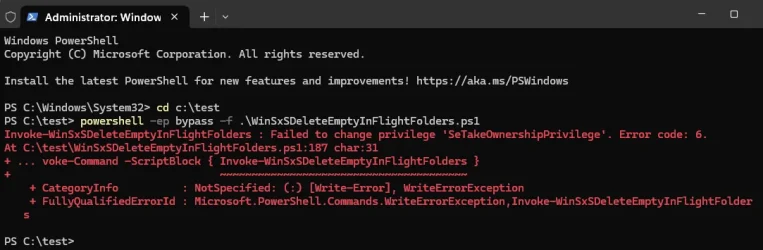
I tried the script as suggested and get the following:
Code:
D:\>powershell -ep bypass -f .\WinSxSDeleteEmptyInFlightFolders.ps1
Invoke-WinSxSDeleteEmptyInFlightFolders : Failed to change privilege 'SeTakeOwnershipPrivilege'. Error code:
6.
At D:\WinSxSDeleteEmptyInFlightFolders.ps1:187 char:31
+ ... voke-Command -ScriptBlock { Invoke-WinSxSDeleteEmptyInFlightFolders }
+                                 ~~~~~~~~~~~~~~~~~~~~~~~~~~~~~~~~~~~~~~~
    + CategoryInfo          : NotSpecified: (:) [Write-Error], WriteErrorException
    + FullyQualifiedErrorId : Microsoft.PowerShell.Commands.WriteErrorException,Invoke-WinSxSDeleteEmptyInFl
   ightFolders
 

My Computer My Computer

At a glance

Windows 11Skylake Gen 6
OS
Windows 11
Computer type
Laptop
Manufacturer/Model
Thinkpad L460
CPU
Skylake Gen 6
I just boot into Macrium Reflect Recovery Mode and use its file explorer to delete such folders. No faffing with dism or regedits.
 

My Computer My Computer

At a glance

Windows 11 Pro + Win11 Canary VM.I9 13th gen i9-13900H 2.60 GHZ16 GB solderedIntegrated Intel Iris XE
OS
Windows 11 Pro + Win11 Canary VM.
Computer type
Laptop
Manufacturer/Model
ASUS Zenbook 14
CPU
I9 13th gen i9-13900H 2.60 GHZ
Motherboard
Yep, Laptop has one.
Memory
16 GB soldered
Graphics Card(s)
Integrated Intel Iris XE
Sound Card
Realtek built in
Monitor(s) Displays
laptop OLED screen
Screen Resolution
2880x1800 touchscreen
Hard Drives
1 TB NVME SSD (only weakness is only one slot)
PSU
Internal + 65W thunderbolt USB4 charger
Case
Yep, got one
Cooling
Stella Artois (UK pint cans - 568 ml) - extra cost.
Keyboard
Built in UK keybd
Mouse
Bluetooth , wireless dongled, wired
Internet Speed
900 mbs (ethernet), wifi 6 typical 350-450 mb/s both up and down
Browser
Edge
Antivirus
Defender
Other Info
TPM 2.0, 2xUSB4 thunderbolt, 1xUsb3 (usb a), 1xUsb-c, hdmi out, 3.5 mm audio out/in combo, ASUS backlit trackpad (inc. switchable number pad)

Macrium Reflect Home V8
Office 365 Family (6 users each 1TB onedrive space)
Hyper-V (a vm runs almost as fast as my older laptop)
What is the purpose of the files in this folder? I'm wary of breaking something fiddling with such files. There are many directories indeed but only 50MB on my laptop.
 

My Computer My Computer

At a glance

Windows 11 ProCore i7-13700K64 GB Kingston Fury Beast DDR5Gigabyte GeForce RTX 2060 Super Gaming OC 8G
OS
Windows 11 Pro
Computer type
PC/Desktop
Manufacturer/Model
Self build
CPU
Core i7-13700K
Motherboard
Asus TUF Gaming Plus WiFi Z790
Memory
64 GB Kingston Fury Beast DDR5
Graphics Card(s)
Gigabyte GeForce RTX 2060 Super Gaming OC 8G
Sound Card
Realtek S1200A
Monitor(s) Displays
Viewsonic VP2770 & Dell (secondary)
Screen Resolution
2560 x 1440
Hard Drives
Kingston KC3000 2TB NVME SSD & SATA HDDs & SSD
PSU
EVGA SuperNova G2 850W
Case
Nanoxia Deep Silence 1
Cooling
Noctua NH-D14
Keyboard
Microsoft Digital Media Pro
Mouse
Logitech Wireless
Internet Speed
80 Mb / s
Browser
Chrome
Antivirus
Defender, Malwarebytes Free & AdwCleaner
Because of this thread I looked at the properties of that folder C:\Windows\WinSxS\Temp\InFlight: about 350 MB.

As in the past I once had been using some Dism command to cleanup WinSxS, that completely ruined my system, I did not want to use some unknown Powershell script for cleaning whatever part of WinSxS.

I now used the regular built-in Disk Cleanup instead and did a system clean as well, including old updates.
Did the disk clean twice, because the second scan still showed about 120 MB to possibly clean from old updates.

The result was remarkable: after cleanup the system partition had 1.33 GiB less than before.
And the folder C:\Windows\WinSxS\Temp\InFlight now only had 38 MB.

So in my opnion: let Windows do the cleanup, no need for (possibly unreliable) scripts.
 

My Computer My Computer

At a glance

Windows 11 Pro 25H2 26200.8457AMD Ryzen 7 5700GKingston FURY Beast 2x16GB DIMM DDR4 2666 CL16MSI GeForce GT 730 2GB LP V1
OS
Windows 11 Pro 25H2 26200.8457
Computer type
PC/Desktop
Manufacturer/Model
Build by vendor to my specs
CPU
AMD Ryzen 7 5700G
Motherboard
MSI PRO B550M-P Gen3
Memory
Kingston FURY Beast 2x16GB DIMM DDR4 2666 CL16
Graphics Card(s)
MSI GeForce GT 730 2GB LP V1
Sound Card
Creative Sound Blaster Audigy FX
Monitor(s) Displays
Samsung S24E450F 24"
Screen Resolution
1920 x 1080
Hard Drives
1. SSD Crucial P5 Plus 500GB PCIe M.2
2. SSD-SATA Crucial MX500-2TB
PSU
Corsair CV650W
Case
Cooler Master Silencio S400
Cooling
Cooler Master Hyper H412R with Be Quiet Pure Wings 2 PWM BL038 fan
Keyboard
Cherry Stream (wired, scissor keys)
Mouse
Asus WT465 (wireless)
Internet Speed
70 Mbps down / 80 Mbps up
Browser
Firefox 130.0
Antivirus
F-Secure (Internetprovider version)
Other Info
Router: FRITZBox 7490
Oracle VirtualBox 7 for testing software on Win 10 or 11
For what it's worth, I don't change the ownership on these folders. I just make sure the admins group has full control.


Thank you so much. I am not one that has the knowledge that you have, so you seem like a good person to ask this question. Please excuse my lack of expertise in this area, I just need to ask someone, (like you - or any other here reading this) just to make sure that I don't mess something up.

Question: If I were to run this command, (below) as administrator, would this do the same as you explained? Would this work to grant "Administrators" full control of a folder, but not take "Ownership"?

The reason I am asking is because this seems like an easier way for me. I like your way too and it's the best way I'm sure, but it seems above my paygrade and I'm just apprehensive trying all that.

Thank you or "anyone reading this" in advance for your help.

Command:
icacls "<folder_path>" /grant:r Administrators:F /t /c


Step-by-step:
Open Command Prompt as Administrator:

Execute the icacls command:
Use the following command, replacing <folder_path> with the actual path to your folder:

icacls "<folder_path>" /grant:r Administrators:F /t /c


Explanation:

icacls: The command-line tool for managing file and folder permissions.

"<folder_path>": The path to the folder you want to modify. Enclose the path in quotes if it contains spaces.

/grant:r: Specifies that you are granting permissions.

Administrators:F: Grants the "Administrators" group full control (F).
 

My Computers My Computers

  • At a glance

    Windows 11 Pro 25H2 26200.8655Intel® Core™ Ultra 7 265 1.8GHz to 5.3GHz (Ar...SK Hynix 32GB DDR5 5600 Desktop RAM UDIMM Non...Dell NVIDIA® GeForce RTX™ 4060 8GB GDDR6 & (i...
    OS
    Windows 11 Pro 25H2 26200.8655
    Computer type
    PC/Desktop
    Manufacturer/Model
    Dell Tower Plus EBT2250, DOB: 06/15/2025
    CPU
    Intel® Core™ Ultra 7 265 1.8GHz to 5.3GHz (Arrow Lake)
    Motherboard
    Dell Inc. 02D3NT A00 (U3E1)
    Memory
    SK Hynix 32GB DDR5 5600 Desktop RAM UDIMM Non-ECC PC5-5600B
    Graphics Card(s)
    Dell NVIDIA® GeForce RTX™ 4060 8GB GDDR6 & (iGPU) Integrated Intel® UHD Graphics
    Sound Card
    Chipset Realtek High-Definition Audio with Dolby Atmos
    Monitor(s) Displays
    Dell Ultra Sharp U2515H 25-Inch Screen LED-Lit
    Screen Resolution
    2560 X 1440
    Hard Drives
    Samsung (NVMe PM9C1a 1024GB) M.2 PCIe NVMe Solid State Drive (OS), with Samsung Piccolo (S4LY022) 6-Core 4 Channel Controller.

    Samsung T7 500GB SSD, USB-C External Drive
    PSU
    Dell 460W
    Case
    Dell Tower Plus EBT 2250
    Cooling
    Fan
    Keyboard
    Dell Wired Keyboard - KB216
    Mouse
    Logitech M510
    Internet Speed
    Intel Killer E3100G 2.5 Gigabit Ethernet Controller
    Browser
    Microsoft Edge
    Antivirus
    Microsoft Windows Security
    Other Info
    The Samsung NVMe PM9C1a 1024GB SSD does not use a Phison NAND controller. Instead, it uses Samsung's in-house developed Piccolo (S4LY022) 6-Core 4 Channel Controller. The PM9C1a utilizes a controller built using Samsung's 5-nanometer process and seventh-generation V-NAND technology. 🤔
  • At a glance

    Windows 11 Pro 25H2 26200.865510th Generation Intel Core i7-10510U Processo...16GB DDR4 RAMNVIDIA® GeForce® MX250 with 2GB GDDR5 graphic...
    Operating System
    Windows 11 Pro 25H2 26200.8655
    Computer type
    Laptop
    Manufacturer/Model
    Dell Inspiron 15 7000 (7591) 2-in-1, DOB: 11/30/2019
    CPU
    10th Generation Intel Core i7-10510U Processor (8MB Cache, up to 4.9 GHz) Comet Lake
    Motherboard
    Dell 0NNW5N
    Memory
    16GB DDR4 RAM
    Graphics card(s)
    NVIDIA® GeForce® MX250 with 2GB GDDR5 graphics memory
    Sound Card
    Chipset Realtek ALC3254 🤔🤣
    Monitor(s) Displays
    Dell 15.6-inch UHD Truelife Touch Narrow Border WVA Display with Active Pen support
    Screen Resolution
    3840 x 2160
    Hard Drives
    Intel NVME 512GB SSD with 32GB Intel Optane Memory, M.2 80mm PCIe 3.0 RAID

    SanDisk 256GB Extreme microSDXC UHS-I Memory Card
    PSU
    Dell 4-Cell Battery, 68 Whr (Integrated), 90 Watt AC Adapter
    Case
    Dell Inspiron 15 7000 2-in-1 (7591)
    Cooling
    Standard Dell Case Fan & Havit HV-F2056 USB Powered (3 Fans) Laptop Cooling Pad.
    Keyboard
    Dell
    Mouse
    Logitech Wireless Mouse M650L
    Internet Speed
    Wireless/Wired connectivity (WiFi 6 - 802.11 ax)
    Browser
    Microsoft Edge
    Antivirus
    Microsoft Windows Security
    Other Info
    From Dell: 512GB NVME Solid State Drive accelerated by 32GB Intel Optane Memory are the fastest as compared to NAND SSDs. Intel Optane H10 with SSD offers speedy storage and accelerates opening your programs.
That looks like it will work; I’m not at a PC where I can test it.

If you’re unsure of what you’re doing, and this isn’t on a test device you can afford to mess up, I would recommend you take a full backup first, in case something goes awry. Nothing wrong with learning and experimenting, just have a way to recover.
 

My Computer My Computer

At a glance

Windows 11 Pro 25H212th Gen Core i7-1260P64 GB Micron PC4-25600Intel Iris Xe Graphics
OS
Windows 11 Pro 25H2
Computer type
PC/Desktop
Manufacturer/Model
Intel NUC12WSHi7
CPU
12th Gen Core i7-1260P
Motherboard
NUC12WSBi7
Memory
64 GB Micron PC4-25600
Graphics Card(s)
Intel Iris Xe Graphics
Sound Card
on-board Realtek HD Audio
Monitor(s) Displays
Dell U3219Q
Screen Resolution
3840 x 2160
Hard Drives
Samsung SSD 990 PRO 1TB
Crucial MX500 2 TB
Antivirus
Microsoft Defender
Thank you sir...
 

My Computers My Computers

  • At a glance

    Windows 11 Pro 25H2 26200.8655Intel® Core™ Ultra 7 265 1.8GHz to 5.3GHz (Ar...SK Hynix 32GB DDR5 5600 Desktop RAM UDIMM Non...Dell NVIDIA® GeForce RTX™ 4060 8GB GDDR6 & (i...
    OS
    Windows 11 Pro 25H2 26200.8655
    Computer type
    PC/Desktop
    Manufacturer/Model
    Dell Tower Plus EBT2250, DOB: 06/15/2025
    CPU
    Intel® Core™ Ultra 7 265 1.8GHz to 5.3GHz (Arrow Lake)
    Motherboard
    Dell Inc. 02D3NT A00 (U3E1)
    Memory
    SK Hynix 32GB DDR5 5600 Desktop RAM UDIMM Non-ECC PC5-5600B
    Graphics Card(s)
    Dell NVIDIA® GeForce RTX™ 4060 8GB GDDR6 & (iGPU) Integrated Intel® UHD Graphics
    Sound Card
    Chipset Realtek High-Definition Audio with Dolby Atmos
    Monitor(s) Displays
    Dell Ultra Sharp U2515H 25-Inch Screen LED-Lit
    Screen Resolution
    2560 X 1440
    Hard Drives
    Samsung (NVMe PM9C1a 1024GB) M.2 PCIe NVMe Solid State Drive (OS), with Samsung Piccolo (S4LY022) 6-Core 4 Channel Controller.

    Samsung T7 500GB SSD, USB-C External Drive
    PSU
    Dell 460W
    Case
    Dell Tower Plus EBT 2250
    Cooling
    Fan
    Keyboard
    Dell Wired Keyboard - KB216
    Mouse
    Logitech M510
    Internet Speed
    Intel Killer E3100G 2.5 Gigabit Ethernet Controller
    Browser
    Microsoft Edge
    Antivirus
    Microsoft Windows Security
    Other Info
    The Samsung NVMe PM9C1a 1024GB SSD does not use a Phison NAND controller. Instead, it uses Samsung's in-house developed Piccolo (S4LY022) 6-Core 4 Channel Controller. The PM9C1a utilizes a controller built using Samsung's 5-nanometer process and seventh-generation V-NAND technology. 🤔
  • At a glance

    Windows 11 Pro 25H2 26200.865510th Generation Intel Core i7-10510U Processo...16GB DDR4 RAMNVIDIA® GeForce® MX250 with 2GB GDDR5 graphic...
    Operating System
    Windows 11 Pro 25H2 26200.8655
    Computer type
    Laptop
    Manufacturer/Model
    Dell Inspiron 15 7000 (7591) 2-in-1, DOB: 11/30/2019
    CPU
    10th Generation Intel Core i7-10510U Processor (8MB Cache, up to 4.9 GHz) Comet Lake
    Motherboard
    Dell 0NNW5N
    Memory
    16GB DDR4 RAM
    Graphics card(s)
    NVIDIA® GeForce® MX250 with 2GB GDDR5 graphics memory
    Sound Card
    Chipset Realtek ALC3254 🤔🤣
    Monitor(s) Displays
    Dell 15.6-inch UHD Truelife Touch Narrow Border WVA Display with Active Pen support
    Screen Resolution
    3840 x 2160
    Hard Drives
    Intel NVME 512GB SSD with 32GB Intel Optane Memory, M.2 80mm PCIe 3.0 RAID

    SanDisk 256GB Extreme microSDXC UHS-I Memory Card
    PSU
    Dell 4-Cell Battery, 68 Whr (Integrated), 90 Watt AC Adapter
    Case
    Dell Inspiron 15 7000 2-in-1 (7591)
    Cooling
    Standard Dell Case Fan & Havit HV-F2056 USB Powered (3 Fans) Laptop Cooling Pad.
    Keyboard
    Dell
    Mouse
    Logitech Wireless Mouse M650L
    Internet Speed
    Wireless/Wired connectivity (WiFi 6 - 802.11 ax)
    Browser
    Microsoft Edge
    Antivirus
    Microsoft Windows Security
    Other Info
    From Dell: 512GB NVME Solid State Drive accelerated by 32GB Intel Optane Memory are the fastest as compared to NAND SSDs. Intel Optane H10 with SSD offers speedy storage and accelerates opening your programs.
Ok that somehow confirms my suspicion why it happens, but not sure of the solutions. Or why it happens. I think the handle gets invalid because process is not yet created, or already ended. And so not able to get the handle. Are the machines that failed, older machines, or really slow/heavy load?

Have done the test with Highest UAC and the removal of administrators from secpol.msc. And it still worked at my end. So people don't have to test that anymore.

edit: New script with some more debug info.
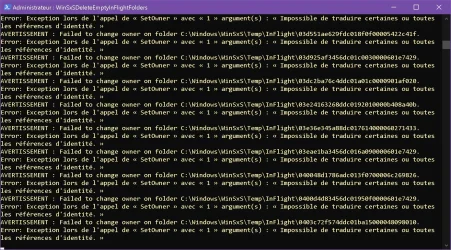
hi, I run this script on w10 ltsc up to date, version 10.0.19044.7184, but i get an error and apparently the script never ends (still running after 15min, it tries over and over to execute on the folders in C:\Windows\WinSxS\Temp\InFlight)
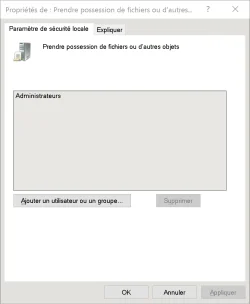
the error: PowerShell: "Some or all identity references could not be translated". I went into secpol and i have indeed the administratorS as authorized
Administrateur _ WinSxSDeleteEmptyInFlightFolders_2026-04-23 16_57_47.webp
Propriétés de _ Prendre possession de fichiers ou d’autres objets_2026-04-23 16_58_48.webp
 

My Computer My Computer

At a glance

Windows 11
OS
Windows 11
I don't believe @Tester's script is language independent. French for Administrator is "Administrateur".

Can you try this updated version?
(Removed bad script, see post #2).
 
Last edited:

My Computer My Computer

At a glance

Windows 7
OS
Windows 7
I don't believe @Tester's script is language independent. French for Administrator is "Administrateur".

Can you try this updated version?
this one returns the error: impossible to convert some string into an identityreference
 

Attachments

  • Administrateur _ C__Windows_system32_cmd.exe - powershell  -ep bypass -f ._WinSx_2026-04-23 1...webp
    Administrateur _ C__Windows_system32_cmd.exe - powershell -ep bypass -f ._WinSx_2026-04-23 1...webp
    375.2 KB · Views: 1

My Computer My Computer

At a glance

Windows 11
OS
Windows 11
Try this one.
(Removed bad script, see post #2).
 
Last edited:

My Computer My Computer

At a glance

Windows 7
OS
Windows 7
yeah this one works if the ":x" is removed below "public class AdjPriv"
 

My Computer My Computer

At a glance

Windows 11
OS
Windows 11
That typo was my fault.

“:x” is the save & exit command in my vim editor.
 

My Computer My Computer

At a glance

Windows 7
OS
Windows 7
I just boot into Macrium Reflect Recovery Mode and use its file explorer to delete such folders. No faffing with dism or regedits.
This should work, but there is more easy way. Start Windows in recovery (safe) mode: press and keep Shift and then restart. Select Command prompt in recovery environment menu, then you can delete the files manually from this prompt or (as I have done) start a compatible file explorer, Total Commander in my case, select all folders and delete them with their content. It takes a few seconds on a system with SSD.
 

My Computer My Computer

At a glance

Windows 11 Pro 25H2AMD Rysen 5 4600H32 GB (2 x 16 GB Samsung SO-DIMM DDR4-3200)GeForce GTX 1650 Ti, 4 GB GDDR6
OS
Windows 11 Pro 25H2
Computer type
Laptop
Manufacturer/Model
Lenovo Legion 5-15ARH05
CPU
AMD Rysen 5 4600H
Memory
32 GB (2 x 16 GB Samsung SO-DIMM DDR4-3200)
Graphics Card(s)
GeForce GTX 1650 Ti, 4 GB GDDR6
Screen Resolution
1920x1080
Hard Drives
SSD M.2 512 GB SAMSUNG MZALQ512; SSD M.2 1 TB Seagate FireCuda 530
Mouse
Logitech M650L in Bluetooth mode
This should work, but there is more easy way. Start Windows in recovery (safe) mode: press and keep Shift and then restart. Select Command prompt in recovery environment menu, then you can delete the files manually from this prompt...

This should work but be careful, deleting this way the objects deleted will not go to the Recycle Bin.

For clearing contents while keeping the folder, use del /q /s "C:\Path\To\Folder*"

EDIT: Well, I just tried that and it did not work as desired. It did not delete the sub folder, just the files in that sub folder.
 
Last edited:

My Computers My Computers

  • At a glance

    Windows 11 Pro 25H2 26200.8655Intel® Core™ Ultra 7 265 1.8GHz to 5.3GHz (Ar...SK Hynix 32GB DDR5 5600 Desktop RAM UDIMM Non...Dell NVIDIA® GeForce RTX™ 4060 8GB GDDR6 & (i...
    OS
    Windows 11 Pro 25H2 26200.8655
    Computer type
    PC/Desktop
    Manufacturer/Model
    Dell Tower Plus EBT2250, DOB: 06/15/2025
    CPU
    Intel® Core™ Ultra 7 265 1.8GHz to 5.3GHz (Arrow Lake)
    Motherboard
    Dell Inc. 02D3NT A00 (U3E1)
    Memory
    SK Hynix 32GB DDR5 5600 Desktop RAM UDIMM Non-ECC PC5-5600B
    Graphics Card(s)
    Dell NVIDIA® GeForce RTX™ 4060 8GB GDDR6 & (iGPU) Integrated Intel® UHD Graphics
    Sound Card
    Chipset Realtek High-Definition Audio with Dolby Atmos
    Monitor(s) Displays
    Dell Ultra Sharp U2515H 25-Inch Screen LED-Lit
    Screen Resolution
    2560 X 1440
    Hard Drives
    Samsung (NVMe PM9C1a 1024GB) M.2 PCIe NVMe Solid State Drive (OS), with Samsung Piccolo (S4LY022) 6-Core 4 Channel Controller.

    Samsung T7 500GB SSD, USB-C External Drive
    PSU
    Dell 460W
    Case
    Dell Tower Plus EBT 2250
    Cooling
    Fan
    Keyboard
    Dell Wired Keyboard - KB216
    Mouse
    Logitech M510
    Internet Speed
    Intel Killer E3100G 2.5 Gigabit Ethernet Controller
    Browser
    Microsoft Edge
    Antivirus
    Microsoft Windows Security
    Other Info
    The Samsung NVMe PM9C1a 1024GB SSD does not use a Phison NAND controller. Instead, it uses Samsung's in-house developed Piccolo (S4LY022) 6-Core 4 Channel Controller. The PM9C1a utilizes a controller built using Samsung's 5-nanometer process and seventh-generation V-NAND technology. 🤔
  • At a glance

    Windows 11 Pro 25H2 26200.865510th Generation Intel Core i7-10510U Processo...16GB DDR4 RAMNVIDIA® GeForce® MX250 with 2GB GDDR5 graphic...
    Operating System
    Windows 11 Pro 25H2 26200.8655
    Computer type
    Laptop
    Manufacturer/Model
    Dell Inspiron 15 7000 (7591) 2-in-1, DOB: 11/30/2019
    CPU
    10th Generation Intel Core i7-10510U Processor (8MB Cache, up to 4.9 GHz) Comet Lake
    Motherboard
    Dell 0NNW5N
    Memory
    16GB DDR4 RAM
    Graphics card(s)
    NVIDIA® GeForce® MX250 with 2GB GDDR5 graphics memory
    Sound Card
    Chipset Realtek ALC3254 🤔🤣
    Monitor(s) Displays
    Dell 15.6-inch UHD Truelife Touch Narrow Border WVA Display with Active Pen support
    Screen Resolution
    3840 x 2160
    Hard Drives
    Intel NVME 512GB SSD with 32GB Intel Optane Memory, M.2 80mm PCIe 3.0 RAID

    SanDisk 256GB Extreme microSDXC UHS-I Memory Card
    PSU
    Dell 4-Cell Battery, 68 Whr (Integrated), 90 Watt AC Adapter
    Case
    Dell Inspiron 15 7000 2-in-1 (7591)
    Cooling
    Standard Dell Case Fan & Havit HV-F2056 USB Powered (3 Fans) Laptop Cooling Pad.
    Keyboard
    Dell
    Mouse
    Logitech Wireless Mouse M650L
    Internet Speed
    Wireless/Wired connectivity (WiFi 6 - 802.11 ax)
    Browser
    Microsoft Edge
    Antivirus
    Microsoft Windows Security
    Other Info
    From Dell: 512GB NVME Solid State Drive accelerated by 32GB Intel Optane Memory are the fastest as compared to NAND SSDs. Intel Optane H10 with SSD offers speedy storage and accelerates opening your programs.
There's nothing in those temp folders that requires special rights, other than running as Administrator.
You don't need to reboot out of Windows.

The problem is the script made a naive assumption that "Administrator" is the same word across the 38 supported Windows language editions. If you're not used to coding for multiple regions, then devs will forget details like this.

A similar problem is enabling firewall rules in other languages.
Code:
Get-NetFirewallRule | where { $_.Group -match '-32752|-28752' } | select -Unique DisplayGroup,Group

DisplayGroup      Group              
------------      -----              
Network Discovery @FirewallAPI.dll,-32752
Remote Desktop    @FirewallAPI.dll,-28752
Code:
Get-NetFirewallRule | where { $_.Group -match '-32752|-28752' } | select -Unique DisplayGroup,Group

DisplayGroup        Group              
------------        -----              
Recherche du réseau @FirewallAPI.dll,-32752
Bureau à distance   @FirewallAPI.dll,-28752

Hopefully, @Tester can update his copy of the script.
 

My Computer My Computer

At a glance

Windows 7
OS
Windows 7
Back
Top Bottom