How to view details of the System File Checker process


Kol12

Well-known member
Member
VIP
Local time
5:19 PM
Posts
342
OS
Windows 11 - Release Preview channel
I am trying to view the details of the System File Checker process. There is a MS support article on how to do so here: Use the System File Checker tool to repair missing or corrupted system files

When I run the command: findstr /c:"[SR]" %windir%\Logs\CBS\CBS.log >"%userprofile%\Desktop\sfcdetails.txt" I receive the error:

out-file : Could not find a part of the path 'C:\Users\MyUsername\%MYUsername%\Desktop\sfcdetails.txt'.
At line:1 char:1
+ findstr /c:"[SR]" %windir%\Logs\CBS\CBS.log >"%MyUsername%\Desktop\s ...
+ ~~~~~~~~~~~~~~~~~~~~~~~~~~~~~~~~~~~~~~~~~~~~~~~~~~~~~~~~~~~~~~~~~~~~~
+ CategoryInfo : OpenError: :)) [Out-File], DirectoryNotFoundException
+ FullyQualifiedErrorId : FileOpenFailure,Microsoft.PowerShell.Commands.OutFileCommand


What is wrong with the command?
 

My Computer My Computer

At a glance

Windows 11 - Release Preview channelIntel 13900KCorsair Dominator Platinum RGB 32GB DDR5 6000MHzGigabyte 4090 Gaming OC
OS
Windows 11 - Release Preview channel
Computer type
PC/Desktop
Manufacturer/Model
Kol's custom ROG
CPU
Intel 13900K
Motherboard
Asus ROG Maximus Hero Z790
Memory
Corsair Dominator Platinum RGB 32GB DDR5 6000MHz
Graphics Card(s)
Gigabyte 4090 Gaming OC
Sound Card
SoundBlaster X-AE5
Monitor(s) Displays
Dell Alienware AW3821DW
Screen Resolution
3840x1600 144hz
Hard Drives
Samsung 980 Pro 500GB
860 EVO's
Samsung 990 Pro 2TB
External RAID enclosure - 2x Seagate 3TB HDD
PSU
Seasonic Prime Ultra 1300W Platinum
Case
Phanteks Eclipse P600S
Cooling
Custom water cooling. EK Velocity (CPU), EK Quantum Vector2 (GPU), EK Quantum D5 Pump, 360mm radiator in case + 560mm external radiator
Keyboard
Corsair K100
Mouse
Logitech G502X
Antivirus
Windows Defender, VBS
The command itself looks OK. Did you use an elevated command prompt?

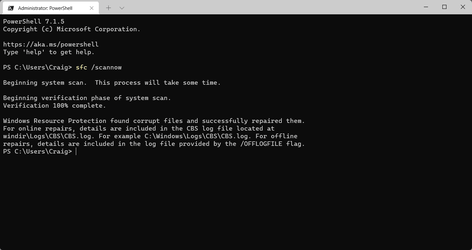
I just ran sfc /scannow and then ran this... (copy/paste from article)

findstr /c:"[SR]" %windir%\Logs\CBS\CBS.log >"%userprofile%\Desktop\sfcdetails.txt"


...and it worked OK for me. But I am on Windows 10 at the moment.


Image1.png
 
Last edited:

My Computers My Computers

  • At a glance

    Win 11 Home ♦♦♦26200.8655 ♦♦♦♦♦♦♦25H2AMD Ryzen 7 3700XG.Skill (F4-3200C14D-16GTZKW)EVGA RTX 2070 (08G-P4-2171-KR)
    OS
    Win 11 Home ♦♦♦26200.8655 ♦♦♦♦♦♦♦25H2
    Computer type
    PC/Desktop
    Manufacturer/Model
    Built by Ghot® [May 2020]
    CPU
    AMD Ryzen 7 3700X
    Motherboard
    Asus Pro WS X570-ACE (BIOS 5302)
    Memory
    G.Skill (F4-3200C14D-16GTZKW)
    Graphics Card(s)
    EVGA RTX 2070 (08G-P4-2171-KR)
    Sound Card
    Realtek ALC1220P / ALC S1220A
    Monitor(s) Displays
    Dell U3011 30"
    Screen Resolution
    2560 x 1600
    Hard Drives
    2x Samsung 860 EVO 500GB,
    WD 4TB Black FZBX - SATA III,
    WD 8TB Black FZBX - SATA III,
    DRW-24B1ST CD/DVD Burner
    PSU
    PC Power & Cooling 750W Quad EPS12V
    Case
    Cooler Master ATCS 840 Tower
    Cooling
    CM Hyper 212 EVO (push/pull)
    Keyboard
    Ducky DK9008 Shine II Blue LED
    Mouse
    Logitech Optical M-100
    Internet Speed
    300/300
    Browser
    Firefox (latest)
    Antivirus
    Bitdefender Total Security
    Other Info
    Speakers: Klipsch Pro Media 2.1
  • At a glance

    Windows XP Pro 32bit w/SP3AMD Athlon 64 X2 5000+ (OC'd @ 3.2Ghz)TWIN2X2048-6400C4DHX (2 x 1GB, DDR2 800)EVGA 256-P2-N758-TR GeForce 8600GT SSC
    Operating System
    Windows XP Pro 32bit w/SP3
    Computer type
    PC/Desktop
    Manufacturer/Model
    Built by Ghot® (not in use)
    CPU
    AMD Athlon 64 X2 5000+ (OC'd @ 3.2Ghz)
    Motherboard
    ASUS M2N32-SLI Deluxe Wireless Edition
    Memory
    TWIN2X2048-6400C4DHX (2 x 1GB, DDR2 800)
    Graphics card(s)
    EVGA 256-P2-N758-TR GeForce 8600GT SSC
    Sound Card
    Onboard
    Monitor(s) Displays
    ViewSonic G90FB Black 19" Professional (CRT)
    Screen Resolution
    up to 2048 x 1536
    Hard Drives
    WD 36GB 10,000rpm Raptor SATA
    Seagate 80GB 7200rpm SATA
    Lite-On LTR-52246S CD/RW
    Lite-On LH-18A1P CD/DVD Burner
    PSU
    PC Power & Cooling Silencer 750 Quad EPS12V
    Case
    Generic Beige case, 80mm fans
    Cooling
    ZALMAN 9500A 92mm CPU Cooler
    Keyboard
    Logitech Classic Keybooard 200
    Mouse
    Logitech Optical M-BT96a
    Internet Speed
    300/300
    Browser
    Firefox 3.x ??
    Antivirus
    Symantec (Norton)
    Other Info
    Still assembled, still runs. Haven't turned it on for 15 years?
What is wrong with the command?
Nothing. Works perfectly for me...

1638086776573.png

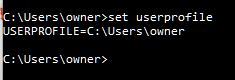
That suggests the environment variable USERPROFILE you used in that command returns an incorrect value.

Open a command prompt and type the command SET USERPROFILE to see what value it returns. It should be C:\Users\MyUsername (or whatever your username really is).

1638087159119.png
 

My Computers My Computers

  • At a glance

    Windows 11 HomeAMD Athlon Silver 3050U8GBRadeon Graphics
    OS
    Windows 11 Home
    Computer type
    Laptop
    Manufacturer/Model
    Acer Aspire 3 A315-23-R9VY
    CPU
    AMD Athlon Silver 3050U
    Memory
    8GB
    Graphics Card(s)
    Radeon Graphics
    Monitor(s) Displays
    laptop screen
    Screen Resolution
    1366x768 native resolution, up to 2560x1440 with Radeon Virtual Super Resolution
    Hard Drives
    1TB Samsung EVO 870 SSD (from April 2026: 250GB EVO 850)
    Internet Speed
    150 Mbps
    Browser
    Edge, Firefox
    Antivirus
    Defender
    Other Info
    fully 'Windows 11 ready' laptop. Windows 10 C: partition migrated from my old unsupported 'main machine' then upgraded to 11. A test migration ran Insider builds for 2 months. When 11 was released on 5th October 2021 it was re-imaged back to 10 and was offered the upgrade in Windows Update on 20th October. Windows Update offered the 22H2 Feature Update on 20th September 2022. It got the 23H2 Feature Update on 4th November 2023 through Windows Update, 24H2 on 3rd October 2024 through Windows Update by setting the Target Release Version for 24H2, and 25H2 on 30th September 2025 through Windows Update by setting the Target Release Version for 25H2.

    UPDATE - 11 April 2026: due to mechanical deterioration this PC has been retired from active duty. The OS with all software and files has been migrated to my System Seven in 'Other systems' to carry on as my general purpose 'main machine'.
  • At a glance

    Windows 11 ProIntel® Core™ i5-520M8GB(integrated graphics) Intel HD Graphics
    Operating System
    Windows 11 Pro
    Computer type
    Laptop
    Manufacturer/Model
    Dell Latitude E4310
    CPU
    Intel® Core™ i5-520M
    Motherboard
    0T6M8G
    Memory
    8GB
    Graphics card(s)
    (integrated graphics) Intel HD Graphics
    Screen Resolution
    1366x768
    Hard Drives
    500GB Crucial MX500 SSD
    Browser
    Firefox, Edge
    Antivirus
    Defender
    Other Info
    unsupported machine: Legacy bios, MBR, TPM 1.2, upgraded from W10 to W11 using W10/W11 hybrid install media workaround.

    In-place upgrade to 22H2 using ISO and a workaround.
    Feature Update to 23H2 by manually installing the Enablement Package.
    In-place upgrade to 24H2 using hybrid 23H2/24H2 install media.
    Upgraded to 25H2 by Enablement Package.

    Also running Insider Dev, and Canary builds and Windows 10 as native boot .vhdx.
  • My SYSTEM THREE is a Dell Latitude 5410, i7-10610U, 32GB RAM, 512GB NVMe ssd, supported device running Windows 11 Pro.

    My SYSTEM FOUR is a 2-in-1 convertible Lenovo Yoga 11e 20DA, Celeron N2930, 8GB RAM, 256GB ssd. Unsupported device: currently running Win10 Pro, plus Win11 Pro RTM and Insider Dev, Beta, and RP 24H2 as native boot vhdx.

    My SYSTEM FIVE is a Dell Latitude 3190 2-in-1, Pentium Silver N5030, 8GB RAM, 1TB NVMe ssd, supported device running Windows 11 Pro, plus Insider Beta, Dev, and Canary builds (and a few others) as a native boot .vhdx.

    My SYSTEM SIX is a Dell Latitude 5550, Core Ultra 7 165H, 64GB RAM, 1TB NVMe SSD, supported device, Windows 11 Pro 24H2, Hyper-V host machine. Updated to 25H2 on 30th September 2025.

    My SYSTEM SEVEN is a Lenovo Thinkpad T580, Intel Core i7-8650U, 16GB RAM, 512GB NVMe SSD + 2nd 512GB NVMe SSD, a supported device for Windows 11. This is my current general purpose 'main machine'. The installed Windows 11 Home from my System One has been migrated to this machine.
See if you can run:
Tuneup_plus_log.bat ─ Click here to go to the BSOD batch repository to download and run this batch file.
SFCfromFile.bat - Click here to go to the BSOD batch repository to download and run this batch file.
 

My Computer My Computer

At a glance

Windows 10Intel(R) Core(TM) i7-4800MQ CPU @ 2.70GHz16 GB Total: Manufacturer : Samsung MemoryTyp...NVIDIA Quadro K3100M; Intel(R) HD Graphics 4600
OS
Windows 10
Computer type
Laptop
Manufacturer/Model
HP
CPU
Intel(R) Core(TM) i7-4800MQ CPU @ 2.70GHz
Motherboard
Product : 190A Version : KBC Version 94.56
Memory
16 GB Total: Manufacturer : Samsung MemoryType : DDR3 FormFactor : SODIMM Capacity : 8GB Speed : 1600
Graphics Card(s)
NVIDIA Quadro K3100M; Intel(R) HD Graphics 4600
Sound Card
IDT High Definition Audio CODEC; PNP Device ID HDAUDIO\FUNC_01&VEN_111D&DEV_76E0
Hard Drives
Model Hitachi HTS727575A9E364
Antivirus
Microsoft Defender
Other Info
Mobile Workstation
I am trying to view the details of the System File Checker process. There is a MS support article on how to do so here: Use the System File Checker tool to repair missing or corrupted system files

When I run the command: findstr /c:"[SR]" %windir%\Logs\CBS\CBS.log >"%userprofile%\Desktop\sfcdetails.txt" I receive the error:

out-file : Could not find a part of the path 'C:\Users\MyUsername\%MYUsername%\Desktop\sfcdetails.txt'.
At line:1 char:1
+ findstr /c:"[SR]" %windir%\Logs\CBS\CBS.log >"%MyUsername%\Desktop\s ...
+ ~~~~~~~~~~~~~~~~~~~~~~~~~~~~~~~~~~~~~~~~~~~~~~~~~~~~~~~~~~~~~~~~~~~~~
+ CategoryInfo : OpenError: :)) [Out-File], DirectoryNotFoundException
+ FullyQualifiedErrorId : FileOpenFailure,Microsoft.PowerShell.Commands.OutFileCommand


What is wrong with the command?
It's a Cmd command (does that make sense? LOL)

The Powershell equivalent would be :

Code:
Select-String -Path (Join-Path $env:windir -ChildPath  "Logs\CBS\CBS.log") -SimpleMatch -Pattern "[SR]" |
Out-File (Join-Path $env:USERPROFILE -ChildPath  "Desktop\sfcdetails.txt")
 
Last edited:

My Computer My Computer

At a glance

Windows
OS
Windows
I just get: The system cannot find the path specified. I get this for both user profiles on my machine.
 

My Computer My Computer

At a glance

Windows 11 - Release Preview channelIntel 13900KCorsair Dominator Platinum RGB 32GB DDR5 6000MHzGigabyte 4090 Gaming OC
OS
Windows 11 - Release Preview channel
Computer type
PC/Desktop
Manufacturer/Model
Kol's custom ROG
CPU
Intel 13900K
Motherboard
Asus ROG Maximus Hero Z790
Memory
Corsair Dominator Platinum RGB 32GB DDR5 6000MHz
Graphics Card(s)
Gigabyte 4090 Gaming OC
Sound Card
SoundBlaster X-AE5
Monitor(s) Displays
Dell Alienware AW3821DW
Screen Resolution
3840x1600 144hz
Hard Drives
Samsung 980 Pro 500GB
860 EVO's
Samsung 990 Pro 2TB
External RAID enclosure - 2x Seagate 3TB HDD
PSU
Seasonic Prime Ultra 1300W Platinum
Case
Phanteks Eclipse P600S
Cooling
Custom water cooling. EK Velocity (CPU), EK Quantum Vector2 (GPU), EK Quantum D5 Pump, 360mm radiator in case + 560mm external radiator
Keyboard
Corsair K100
Mouse
Logitech G502X
Antivirus
Windows Defender, VBS
It's a Cmd command (does that make sense? LOL)
@Kol12 ran it in PowerShell when it should have be run in a Command Prompt. Well spotted. Running a CMD command in PowerShell rarely turns out well :lmao:
 

My Computers My Computers

  • At a glance

    Windows 11 HomeAMD Athlon Silver 3050U8GBRadeon Graphics
    OS
    Windows 11 Home
    Computer type
    Laptop
    Manufacturer/Model
    Acer Aspire 3 A315-23-R9VY
    CPU
    AMD Athlon Silver 3050U
    Memory
    8GB
    Graphics Card(s)
    Radeon Graphics
    Monitor(s) Displays
    laptop screen
    Screen Resolution
    1366x768 native resolution, up to 2560x1440 with Radeon Virtual Super Resolution
    Hard Drives
    1TB Samsung EVO 870 SSD (from April 2026: 250GB EVO 850)
    Internet Speed
    150 Mbps
    Browser
    Edge, Firefox
    Antivirus
    Defender
    Other Info
    fully 'Windows 11 ready' laptop. Windows 10 C: partition migrated from my old unsupported 'main machine' then upgraded to 11. A test migration ran Insider builds for 2 months. When 11 was released on 5th October 2021 it was re-imaged back to 10 and was offered the upgrade in Windows Update on 20th October. Windows Update offered the 22H2 Feature Update on 20th September 2022. It got the 23H2 Feature Update on 4th November 2023 through Windows Update, 24H2 on 3rd October 2024 through Windows Update by setting the Target Release Version for 24H2, and 25H2 on 30th September 2025 through Windows Update by setting the Target Release Version for 25H2.

    UPDATE - 11 April 2026: due to mechanical deterioration this PC has been retired from active duty. The OS with all software and files has been migrated to my System Seven in 'Other systems' to carry on as my general purpose 'main machine'.
  • At a glance

    Windows 11 ProIntel® Core™ i5-520M8GB(integrated graphics) Intel HD Graphics
    Operating System
    Windows 11 Pro
    Computer type
    Laptop
    Manufacturer/Model
    Dell Latitude E4310
    CPU
    Intel® Core™ i5-520M
    Motherboard
    0T6M8G
    Memory
    8GB
    Graphics card(s)
    (integrated graphics) Intel HD Graphics
    Screen Resolution
    1366x768
    Hard Drives
    500GB Crucial MX500 SSD
    Browser
    Firefox, Edge
    Antivirus
    Defender
    Other Info
    unsupported machine: Legacy bios, MBR, TPM 1.2, upgraded from W10 to W11 using W10/W11 hybrid install media workaround.

    In-place upgrade to 22H2 using ISO and a workaround.
    Feature Update to 23H2 by manually installing the Enablement Package.
    In-place upgrade to 24H2 using hybrid 23H2/24H2 install media.
    Upgraded to 25H2 by Enablement Package.

    Also running Insider Dev, and Canary builds and Windows 10 as native boot .vhdx.
  • My SYSTEM THREE is a Dell Latitude 5410, i7-10610U, 32GB RAM, 512GB NVMe ssd, supported device running Windows 11 Pro.

    My SYSTEM FOUR is a 2-in-1 convertible Lenovo Yoga 11e 20DA, Celeron N2930, 8GB RAM, 256GB ssd. Unsupported device: currently running Win10 Pro, plus Win11 Pro RTM and Insider Dev, Beta, and RP 24H2 as native boot vhdx.

    My SYSTEM FIVE is a Dell Latitude 3190 2-in-1, Pentium Silver N5030, 8GB RAM, 1TB NVMe ssd, supported device running Windows 11 Pro, plus Insider Beta, Dev, and Canary builds (and a few others) as a native boot .vhdx.

    My SYSTEM SIX is a Dell Latitude 5550, Core Ultra 7 165H, 64GB RAM, 1TB NVMe SSD, supported device, Windows 11 Pro 24H2, Hyper-V host machine. Updated to 25H2 on 30th September 2025.

    My SYSTEM SEVEN is a Lenovo Thinkpad T580, Intel Core i7-8650U, 16GB RAM, 512GB NVMe SSD + 2nd 512GB NVMe SSD, a supported device for Windows 11. This is my current general purpose 'main machine'. The installed Windows 11 Home from my System One has been migrated to this machine.
I ran it in Windows Terminal yes...

OK I ran it from Command Prompt in the admin account and it worked. So my question now is how can see what files were corrupted and repaired? All I see is: Beginning Verify and Repair transaction, Verify complete.
 

My Computer My Computer

At a glance

Windows 11 - Release Preview channelIntel 13900KCorsair Dominator Platinum RGB 32GB DDR5 6000MHzGigabyte 4090 Gaming OC
OS
Windows 11 - Release Preview channel
Computer type
PC/Desktop
Manufacturer/Model
Kol's custom ROG
CPU
Intel 13900K
Motherboard
Asus ROG Maximus Hero Z790
Memory
Corsair Dominator Platinum RGB 32GB DDR5 6000MHz
Graphics Card(s)
Gigabyte 4090 Gaming OC
Sound Card
SoundBlaster X-AE5
Monitor(s) Displays
Dell Alienware AW3821DW
Screen Resolution
3840x1600 144hz
Hard Drives
Samsung 980 Pro 500GB
860 EVO's
Samsung 990 Pro 2TB
External RAID enclosure - 2x Seagate 3TB HDD
PSU
Seasonic Prime Ultra 1300W Platinum
Case
Phanteks Eclipse P600S
Cooling
Custom water cooling. EK Velocity (CPU), EK Quantum Vector2 (GPU), EK Quantum D5 Pump, 360mm radiator in case + 560mm external radiator
Keyboard
Corsair K100
Mouse
Logitech G502X
Antivirus
Windows Defender, VBS
Yep seems a bit useless TBH I also just have "Beginning Verify and Repair transaction" only - perhaps there are other strings we need to get?

(BTW: there was a space I had to remove from the PS command above so copy paste works w/o error)
 

My Computer My Computer

At a glance

Windows
OS
Windows
All I see is: Beginning Verify and Repair transaction, Verify complete.
That means that no files were corrupt and had to be replaced from the component store. But there is another form of corruption that SFC may find and report that it fixed that doesn't get the "[SR]" tag, permissions that are set twice. To find if those were the errors SFC fixed, open the CBS.log itself in Notepad and search for the string 'twice'.
 

My Computers My Computers

  • At a glance

    Windows 11 HomeAMD Athlon Silver 3050U8GBRadeon Graphics
    OS
    Windows 11 Home
    Computer type
    Laptop
    Manufacturer/Model
    Acer Aspire 3 A315-23-R9VY
    CPU
    AMD Athlon Silver 3050U
    Memory
    8GB
    Graphics Card(s)
    Radeon Graphics
    Monitor(s) Displays
    laptop screen
    Screen Resolution
    1366x768 native resolution, up to 2560x1440 with Radeon Virtual Super Resolution
    Hard Drives
    1TB Samsung EVO 870 SSD (from April 2026: 250GB EVO 850)
    Internet Speed
    150 Mbps
    Browser
    Edge, Firefox
    Antivirus
    Defender
    Other Info
    fully 'Windows 11 ready' laptop. Windows 10 C: partition migrated from my old unsupported 'main machine' then upgraded to 11. A test migration ran Insider builds for 2 months. When 11 was released on 5th October 2021 it was re-imaged back to 10 and was offered the upgrade in Windows Update on 20th October. Windows Update offered the 22H2 Feature Update on 20th September 2022. It got the 23H2 Feature Update on 4th November 2023 through Windows Update, 24H2 on 3rd October 2024 through Windows Update by setting the Target Release Version for 24H2, and 25H2 on 30th September 2025 through Windows Update by setting the Target Release Version for 25H2.

    UPDATE - 11 April 2026: due to mechanical deterioration this PC has been retired from active duty. The OS with all software and files has been migrated to my System Seven in 'Other systems' to carry on as my general purpose 'main machine'.
  • At a glance

    Windows 11 ProIntel® Core™ i5-520M8GB(integrated graphics) Intel HD Graphics
    Operating System
    Windows 11 Pro
    Computer type
    Laptop
    Manufacturer/Model
    Dell Latitude E4310
    CPU
    Intel® Core™ i5-520M
    Motherboard
    0T6M8G
    Memory
    8GB
    Graphics card(s)
    (integrated graphics) Intel HD Graphics
    Screen Resolution
    1366x768
    Hard Drives
    500GB Crucial MX500 SSD
    Browser
    Firefox, Edge
    Antivirus
    Defender
    Other Info
    unsupported machine: Legacy bios, MBR, TPM 1.2, upgraded from W10 to W11 using W10/W11 hybrid install media workaround.

    In-place upgrade to 22H2 using ISO and a workaround.
    Feature Update to 23H2 by manually installing the Enablement Package.
    In-place upgrade to 24H2 using hybrid 23H2/24H2 install media.
    Upgraded to 25H2 by Enablement Package.

    Also running Insider Dev, and Canary builds and Windows 10 as native boot .vhdx.
  • My SYSTEM THREE is a Dell Latitude 5410, i7-10610U, 32GB RAM, 512GB NVMe ssd, supported device running Windows 11 Pro.

    My SYSTEM FOUR is a 2-in-1 convertible Lenovo Yoga 11e 20DA, Celeron N2930, 8GB RAM, 256GB ssd. Unsupported device: currently running Win10 Pro, plus Win11 Pro RTM and Insider Dev, Beta, and RP 24H2 as native boot vhdx.

    My SYSTEM FIVE is a Dell Latitude 3190 2-in-1, Pentium Silver N5030, 8GB RAM, 1TB NVMe ssd, supported device running Windows 11 Pro, plus Insider Beta, Dev, and Canary builds (and a few others) as a native boot .vhdx.

    My SYSTEM SIX is a Dell Latitude 5550, Core Ultra 7 165H, 64GB RAM, 1TB NVMe SSD, supported device, Windows 11 Pro 24H2, Hyper-V host machine. Updated to 25H2 on 30th September 2025.

    My SYSTEM SEVEN is a Lenovo Thinkpad T580, Intel Core i7-8650U, 16GB RAM, 512GB NVMe SSD + 2nd 512GB NVMe SSD, a supported device for Windows 11. This is my current general purpose 'main machine'. The installed Windows 11 Home from my System One has been migrated to this machine.
Yep seems a bit useless TBH I also just have "Beginning Verify and Repair transaction" only - perhaps there are other strings we need to get?

(BTW: there was a space I had to remove from the PS command above so copy paste works w/o error)
Maybe it will only tell you what files are corrupted in the sfcdetails.txt if it can't repair them? I am wanting to see what files were corrupted anyway.
 

My Computer My Computer

At a glance

Windows 11 - Release Preview channelIntel 13900KCorsair Dominator Platinum RGB 32GB DDR5 6000MHzGigabyte 4090 Gaming OC
OS
Windows 11 - Release Preview channel
Computer type
PC/Desktop
Manufacturer/Model
Kol's custom ROG
CPU
Intel 13900K
Motherboard
Asus ROG Maximus Hero Z790
Memory
Corsair Dominator Platinum RGB 32GB DDR5 6000MHz
Graphics Card(s)
Gigabyte 4090 Gaming OC
Sound Card
SoundBlaster X-AE5
Monitor(s) Displays
Dell Alienware AW3821DW
Screen Resolution
3840x1600 144hz
Hard Drives
Samsung 980 Pro 500GB
860 EVO's
Samsung 990 Pro 2TB
External RAID enclosure - 2x Seagate 3TB HDD
PSU
Seasonic Prime Ultra 1300W Platinum
Case
Phanteks Eclipse P600S
Cooling
Custom water cooling. EK Velocity (CPU), EK Quantum Vector2 (GPU), EK Quantum D5 Pump, 360mm radiator in case + 560mm external radiator
Keyboard
Corsair K100
Mouse
Logitech G502X
Antivirus
Windows Defender, VBS
That means that no files were corrupt and had to be replaced from the component store. But there is another form of corruption that SFC may find and report that it fixed that doesn't get the "[SR]" tag, permissions that are set twice. To find if those were the errors SFC fixed, open the CBS.log itself in Notepad and search for the string 'twice'.
There is no "twice" in my CBS.log and all I have is "Beginning Verify and Repair transaction, Verify complete" in the sfcdetails.txt. However SFC /scannow found integrity violations and fixed them. Is there anything else in the CBS.log to look for?
 

My Computer My Computer

At a glance

Windows 11 - Release Preview channelIntel 13900KCorsair Dominator Platinum RGB 32GB DDR5 6000MHzGigabyte 4090 Gaming OC
OS
Windows 11 - Release Preview channel
Computer type
PC/Desktop
Manufacturer/Model
Kol's custom ROG
CPU
Intel 13900K
Motherboard
Asus ROG Maximus Hero Z790
Memory
Corsair Dominator Platinum RGB 32GB DDR5 6000MHz
Graphics Card(s)
Gigabyte 4090 Gaming OC
Sound Card
SoundBlaster X-AE5
Monitor(s) Displays
Dell Alienware AW3821DW
Screen Resolution
3840x1600 144hz
Hard Drives
Samsung 980 Pro 500GB
860 EVO's
Samsung 990 Pro 2TB
External RAID enclosure - 2x Seagate 3TB HDD
PSU
Seasonic Prime Ultra 1300W Platinum
Case
Phanteks Eclipse P600S
Cooling
Custom water cooling. EK Velocity (CPU), EK Quantum Vector2 (GPU), EK Quantum D5 Pump, 360mm radiator in case + 560mm external radiator
Keyboard
Corsair K100
Mouse
Logitech G502X
Antivirus
Windows Defender, VBS
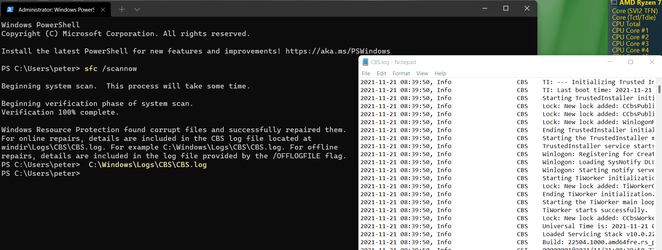
If there are corrupt files then I simply copy and paste 'C:\Windows\Logs\CBS\CBS.log' whether it's in PowerShell or CMD and it opens the log so I can save to desktop.

Screenshot_2.png
 

My Computers My Computers

  • At a glance

    Win 11 ProAMD Ryzen™ 7 7730U24GB Dual-Channel DDR4 @ 1596MHz (22-22-22-52)512MB ATI AMD Radeon Graphics (ASUStek Comput...
    OS
    Win 11 Pro
    Computer type
    Laptop
    Manufacturer/Model
    ASUS Vivobook
    CPU
    AMD Ryzen™ 7 7730U
    Motherboard
    M1605YA
    Memory
    24GB Dual-Channel DDR4 @ 1596MHz (22-22-22-52)
    Graphics Card(s)
    512MB ATI AMD Radeon Graphics (ASUStek Computer Inc)
    Monitor(s) Displays
    Generic PnP Monitor (1920x1200@60Hz) - P1 PLUS (1920x1080@59Hz)
    Screen Resolution
    1920 X 1200
    Hard Drives
    953GB Western Digital WD
    PSU
    45 Watts
    Mouse
    Lenovo Bluetooth.
    Internet Speed
    500 Mbps
    Browser
    Edge
    Antivirus
    Defender
  • At a glance

    Windows 11AMD Ryzen 7 5800H / 3.2 GHz32 GB DDR4 SDRAM 3200 MHzNVIDIA GeForce RTX 3060 6 GB GDDR6 SDRAM
    Operating System
    Windows 11
    Computer type
    Laptop
    Manufacturer/Model
    ACER NITRO
    CPU
    AMD Ryzen 7 5800H / 3.2 GHz
    Motherboard
    CZ Scala_CAS (FP6)
    Memory
    32 GB DDR4 SDRAM 3200 MHz
    Graphics card(s)
    NVIDIA GeForce RTX 3060 6 GB GDDR6 SDRAM
    Sound Card
    Realtek Audio. NVIDIA High Definition Audio
    Monitor(s) Displays
    15.6" LED backlight 1920 x 1080 (Full HD) 144 Hz
    Screen Resolution
    1920 x 1080 (Full HD)
    Hard Drives
    Samsung 970 Evo Plus 2TB NVMe M.2
    PSU
    180 Watt, 19.5 V
    Mouse
    Lenovo Bluetooth
    Internet Speed
    500 Mbps
    Browser
    Edge
    Antivirus
    Defender
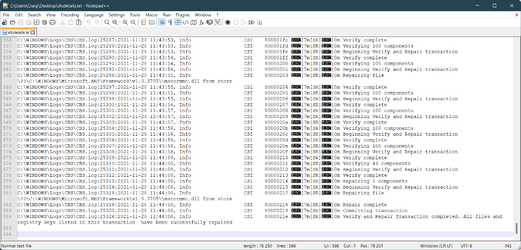
OK, so I ran sfc /scannow and it found corruption
1638092851183.png


Ran the above command it lists the corrupted files under "Repairing file" - so not useless.. ✌️

1638092832002.png
 

My Computer My Computer

At a glance

Windows
OS
Windows

Attachments

  • sfcdetails.jpg
    sfcdetails.jpg
    164 KB · Views: 2

My Computer My Computer

At a glance

Windows 11 - Release Preview channelIntel 13900KCorsair Dominator Platinum RGB 32GB DDR5 6000MHzGigabyte 4090 Gaming OC
OS
Windows 11 - Release Preview channel
Computer type
PC/Desktop
Manufacturer/Model
Kol's custom ROG
CPU
Intel 13900K
Motherboard
Asus ROG Maximus Hero Z790
Memory
Corsair Dominator Platinum RGB 32GB DDR5 6000MHz
Graphics Card(s)
Gigabyte 4090 Gaming OC
Sound Card
SoundBlaster X-AE5
Monitor(s) Displays
Dell Alienware AW3821DW
Screen Resolution
3840x1600 144hz
Hard Drives
Samsung 980 Pro 500GB
860 EVO's
Samsung 990 Pro 2TB
External RAID enclosure - 2x Seagate 3TB HDD
PSU
Seasonic Prime Ultra 1300W Platinum
Case
Phanteks Eclipse P600S
Cooling
Custom water cooling. EK Velocity (CPU), EK Quantum Vector2 (GPU), EK Quantum D5 Pump, 360mm radiator in case + 560mm external radiator
Keyboard
Corsair K100
Mouse
Logitech G502X
Antivirus
Windows Defender, VBS
My sfcdetails.txt does not look like that. I only have the date and time. How did you get it to show the rest of the file path?
Run the PowerShell script to get full details.
 

My Computer My Computer

At a glance

Windows
OS
Windows
Run the PowerShell script to get full details.
I got the full details with the PowerShell script but my log did not show any particular files that were repaired like yours. I wonder why it detected integrity violation in the first place. :unsure:
 

My Computer My Computer

At a glance

Windows 11 - Release Preview channelIntel 13900KCorsair Dominator Platinum RGB 32GB DDR5 6000MHzGigabyte 4090 Gaming OC
OS
Windows 11 - Release Preview channel
Computer type
PC/Desktop
Manufacturer/Model
Kol's custom ROG
CPU
Intel 13900K
Motherboard
Asus ROG Maximus Hero Z790
Memory
Corsair Dominator Platinum RGB 32GB DDR5 6000MHz
Graphics Card(s)
Gigabyte 4090 Gaming OC
Sound Card
SoundBlaster X-AE5
Monitor(s) Displays
Dell Alienware AW3821DW
Screen Resolution
3840x1600 144hz
Hard Drives
Samsung 980 Pro 500GB
860 EVO's
Samsung 990 Pro 2TB
External RAID enclosure - 2x Seagate 3TB HDD
PSU
Seasonic Prime Ultra 1300W Platinum
Case
Phanteks Eclipse P600S
Cooling
Custom water cooling. EK Velocity (CPU), EK Quantum Vector2 (GPU), EK Quantum D5 Pump, 360mm radiator in case + 560mm external radiator
Keyboard
Corsair K100
Mouse
Logitech G502X
Antivirus
Windows Defender, VBS

Latest Support Threads

Back
Top Bottom