Solved Windows 11 version 25H2 fails to install: we couldn't update the system reserved partition


Nick12345

New member
Local time
5:58 AM
Posts
9
OS
Windows 11 Home 25H2
Hello everyone, and nice to meet you all.

Since yesterday, after receiving a Windows Update notification that version 25H2 is available for my laptop, I’ve been experiencing the following issue:
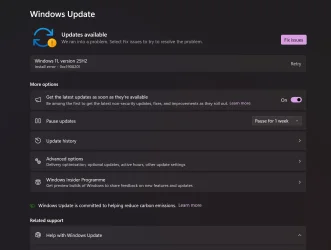
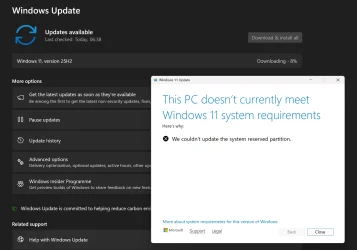
Issue_1.webp


Issue_2.webp


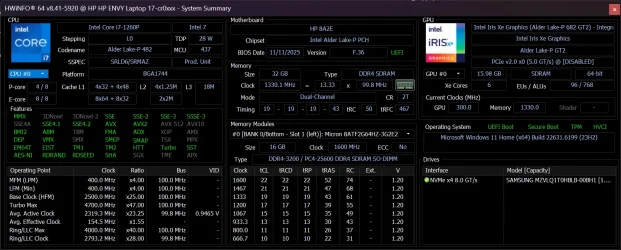
My laptop's specifications:
SystemInfo.webp


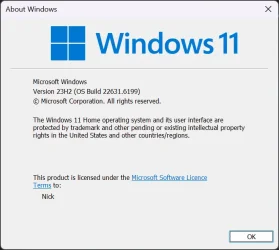
My current Windows 11 Home version

ver.webp


I have tried the following:

Open Command Prompt as Administrator: Search for cmd in the Start menu, right-click, and select "Run as administrator".

Mount the Partition: Type mountvol y: /s and press Enter to assign the Y: drive letter to the system partition.

Navigate to the Fonts Folder: Type y: and press Enter. Then, navigate to the fonts folder by typing cd EFI\Microsoft\Boot\Fonts and press Enter.
Delete Font Files: Type del *.* and press Enter to delete font files. Confirm with Y if prompted.

Restart and Update: Close the command prompt and restart your computer to apply the changes, then retry the Windows 11 installation.

This does not work. I have tried multiple times but I am getting the same error.

Can anyone help, please?

Thank you very much!
 

My Computer

System One

  • OS
    Windows 11 Home 25H2
    Computer type
    Laptop
    Manufacturer/Model
    Hewlett Packard
1) Please add WMIC:

Code:
DISM /Online /Add-Capability /CapabilityName:WMIC~~~~


2) Run tuneup_plus_log.bat > post a share link


3) Run upgrade_failure_info.bat > post a share link


4) Run the V2 log collector > post a share link


5) Run diskparinfo.bat > post a share link


6) Open administrative command prompt and type or copy and paste:

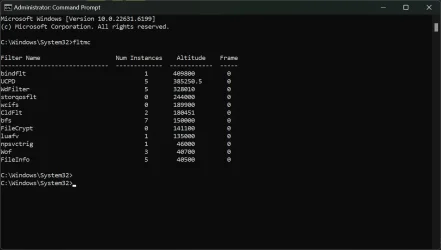
fltmc
mountvol Y: /s
dir Y:\ /s /a >c:\dir.txt

Post a share link
 

My Computer

System One

  • OS
    Windows 10
    Computer type
    Laptop
    Manufacturer/Model
    HP
    CPU
    Intel(R) Core(TM) i7-4800MQ CPU @ 2.70GHz
    Motherboard
    Product : 190A Version : KBC Version 94.56
    Memory
    16 GB Total: Manufacturer : Samsung MemoryType : DDR3 FormFactor : SODIMM Capacity : 8GB Speed : 1600
    Graphics Card(s)
    NVIDIA Quadro K3100M; Intel(R) HD Graphics 4600
    Sound Card
    IDT High Definition Audio CODEC; PNP Device ID HDAUDIO\FUNC_01&VEN_111D&DEV_76E0
    Hard Drives
    Model Hitachi HTS727575A9E364
    Antivirus
    Microsoft Defender
    Other Info
    Mobile Workstation

What's the size of your reserve partition? Mine is 100MB and 65MB free
 

My Computers

System One System Two

  • OS
    Windows 11 (up to date)
    Computer type
    PC/Desktop
    Manufacturer/Model
    Custom
    CPU
    Intel i5 12400
    Motherboard
    Gigabyte Z690 UA
    Memory
    Corsair Vengeance LPX 16GB
    Graphics Card(s)
    On Board the Z690
    Sound Card
    On Board
    Monitor(s) Displays
    43" Samsung tu7000
    Screen Resolution
    2560 x 1440
    Hard Drives
    SAMSUNG SSD 1TB NVMe M.2
    PSU
    Thermaltake smart 500w 80+
    Case
    LIAN LANCOOL_205M
    Cooling
    Bunch of fans . . . :o) (lights dont work)
    Keyboard
    Unicomp: Ultra Classic White Buckling Spring USB
    Mouse
    M510
    Internet Speed
    50mbps on Ethernet
    Browser
    Fire Fox
    Antivirus
    Windows
    Other Info
    Love this computer but I still prefer Win-7 like I love my old Lazy Boy Recliner . . . it just feels better.
  • Operating System
    WIN-7-64BIT and Win-11 pro for testing on unsupported hardware
    Computer type
    PC/Desktop
    Manufacturer/Model
    Home built
    CPU
    i5-3570K CPU @ 3.40GHz, 3801 Mhz, 4 Core(s), 4 Logical Processor(s)
    Motherboard
    GA-Z77-HD3
    Memory
    16 GB - Crucial Ballistick 4GB PC3-14900 DDR3-1333 MHz
    Graphics card(s)
    NVIDIA GeForce GTX 1050
    Sound Card
    On Board
    Monitor(s) Displays
    ASUS VP278
    Screen Resolution
    1920 x 1080
    Hard Drives
    4 - internal Samsung 2.5" SSD, 1 WD HDD 7200 and some external drives
    PSU
    EVGA 550w
    Case
    Old Gygabyte Tower
    Cooling
    Yes
    Keyboard
    Unicomp - UNIOP4A USB (like the old IBM Model H that I started with)
    Mouse
    M510
    Internet Speed
    50mbps
    Browser
    Firefox
    Antivirus
    Windows
    Other Info
    The only thing it lack is USB-3.2 on the front face but it has 3.0 on the back
@zbook
Thank you for your support! I have successfully completed Step 1 (add WMIC) and Step 2 (Run upgrade_failure_info.bat). After completing Step 2, I now have a zipped folder on my Desktop: Tuneup_log 2026-02-14 at 13-13-24 - How do I share this folder here, please?

Regarding Step 3, I am taken to Windows 10 Forums, however I cannot download upgrade_failure_info.bat because it asks me to login to Windows 10 Forums and I do not have an account there.

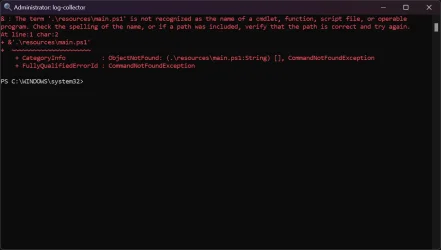
Regarding Step 4: Run the V2 log collector, I have tried but I am getting the following error message:

logCollector.webp

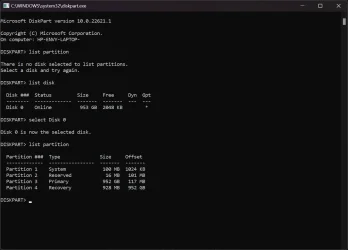
@john1955 how do I check the size of my reserve partition, please?

Do you mean this?

parti.webp
 
Last edited:

My Computer

System One

  • OS
    Windows 11 Home 25H2
    Computer type
    Laptop
    Manufacturer/Model
    Hewlett Packard
I suggest you delete and create new system reserve partition.

In this video, i will take you through the steps to create a Windows recovery partition in a Windows 10 or Windows 11 PC installed in UEFI mode with GPT partition style.
 

My Computer

System One

  • OS
    Windows 11
    Computer type
    PC/Desktop
    Manufacturer/Model
    HP Pavilion
    CPU
    AMD Ryzen 7 5700G
    Motherboard
    Erica6
    Memory
    Micron Technology DDR4-3200 16GB
    Graphics Card(s)
    NVIDIA GeForce RTX 3060
    Sound Card
    Realtek ALC671
    Monitor(s) Displays
    Samsung SyncMaster U28E590
    Screen Resolution
    3840 x 2160
    Hard Drives
    SAMSUNG MZVLQ1T0HALB-000H1
If you download and use minitool - you can resize the system reserved partition and make it bigger. I think it's a known thing that Windows 11 needs a larger system reserved partition. It's easy to resize it using minitool partition wizard. Mine is 200mb (from a clean install - Windows automatically created it at clean install).
 

My Computers

System One System Two

  • OS
    Windows 11 Home 25H2
    Computer type
    Laptop
    Manufacturer/Model
    HP Pavilion 14-ce3606sa
    CPU
    Core i5-1035G1
    Memory
    32gb
    Hard Drives
    Samsung 870 evo sata ssd
    Cooling
    Could be better
    Internet Speed
    50 mbps Starlink
    Browser
    Firefox
    Other Info
    Originally came installed with a 500gb H10 Optane ssd
  • Operating System
    Windows 11 Home
    Computer type
    Laptop
    Manufacturer/Model
    HP Pavilion ce3606sa
    CPU
    Intel Core i5-1035G1
    Memory
    16gb
    Hard Drives
    Hynix Gold P31 2TB
    Internet Speed
    200mbps Starlink
    Browser
    Firefox
    Antivirus
    Defender
For share links please use:

Drop box
Google drive


For V2 > view the menu bar > click "extract all" > after the box reappears > run V2 > post a share link into the newest post


For the scripts see if you can launch them from this Eleven Forum link:


If these links still require TF logon then please register / logon and comment into this thread.
 

My Computer

System One

  • OS
    Windows 10
    Computer type
    Laptop
    Manufacturer/Model
    HP
    CPU
    Intel(R) Core(TM) i7-4800MQ CPU @ 2.70GHz
    Motherboard
    Product : 190A Version : KBC Version 94.56
    Memory
    16 GB Total: Manufacturer : Samsung MemoryType : DDR3 FormFactor : SODIMM Capacity : 8GB Speed : 1600
    Graphics Card(s)
    NVIDIA Quadro K3100M; Intel(R) HD Graphics 4600
    Sound Card
    IDT High Definition Audio CODEC; PNP Device ID HDAUDIO\FUNC_01&VEN_111D&DEV_76E0
    Hard Drives
    Model Hitachi HTS727575A9E364
    Antivirus
    Microsoft Defender
    Other Info
    Mobile Workstation
Hello all,

Thank you for your replies, so far.

@FreeBooter - the error message I am getting refers to the Reserved Partition, 16MB in my case, but this is actually misleading? Do they refer to the actual System Partition, as shown in my screenshot, so Partition 1? Is that the Partition that needs resizing? I have watched your video. I am willing to try it. Is this going to work 100%? Will I be able to boot back into Windows if this will not work? This laptop is my primary and only device. I cannot afford it to malfunction. Also, for what it's worth, I have faced similar issues (not enough space on a partition, when a new BIOS has been available for my laptop. I had to try 4 - 5 times to install a new BIOS and I had to use a USB stick. It finally updated, not sure how.

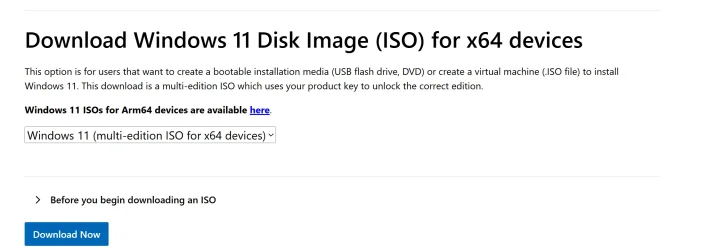
Which Windows 11 ISO should I download, please? Is it the one shown here:

iso.webp

@Hazel123 thank you for your recommendation. I think I will try what @FreeBooter recommended.
 

My Computer

System One

  • OS
    Windows 11 Home 25H2
    Computer type
    Laptop
    Manufacturer/Model
    Hewlett Packard
It's confusing because the error says it cannot update the System Reserve partition but you have a system and a reserve partition and I only have the 100mb System so I'm going to just watch this thread But I assume you do have a recent backup image of the disks(?) I dont know why it's trying to write to that reserve partition when I dont even have one on either of my computers
 
Last edited:

My Computers

System One System Two

  • OS
    Windows 11 (up to date)
    Computer type
    PC/Desktop
    Manufacturer/Model
    Custom
    CPU
    Intel i5 12400
    Motherboard
    Gigabyte Z690 UA
    Memory
    Corsair Vengeance LPX 16GB
    Graphics Card(s)
    On Board the Z690
    Sound Card
    On Board
    Monitor(s) Displays
    43" Samsung tu7000
    Screen Resolution
    2560 x 1440
    Hard Drives
    SAMSUNG SSD 1TB NVMe M.2
    PSU
    Thermaltake smart 500w 80+
    Case
    LIAN LANCOOL_205M
    Cooling
    Bunch of fans . . . :o) (lights dont work)
    Keyboard
    Unicomp: Ultra Classic White Buckling Spring USB
    Mouse
    M510
    Internet Speed
    50mbps on Ethernet
    Browser
    Fire Fox
    Antivirus
    Windows
    Other Info
    Love this computer but I still prefer Win-7 like I love my old Lazy Boy Recliner . . . it just feels better.
  • Operating System
    WIN-7-64BIT and Win-11 pro for testing on unsupported hardware
    Computer type
    PC/Desktop
    Manufacturer/Model
    Home built
    CPU
    i5-3570K CPU @ 3.40GHz, 3801 Mhz, 4 Core(s), 4 Logical Processor(s)
    Motherboard
    GA-Z77-HD3
    Memory
    16 GB - Crucial Ballistick 4GB PC3-14900 DDR3-1333 MHz
    Graphics card(s)
    NVIDIA GeForce GTX 1050
    Sound Card
    On Board
    Monitor(s) Displays
    ASUS VP278
    Screen Resolution
    1920 x 1080
    Hard Drives
    4 - internal Samsung 2.5" SSD, 1 WD HDD 7200 and some external drives
    PSU
    EVGA 550w
    Case
    Old Gygabyte Tower
    Cooling
    Yes
    Keyboard
    Unicomp - UNIOP4A USB (like the old IBM Model H that I started with)
    Mouse
    M510
    Internet Speed
    50mbps
    Browser
    Firefox
    Antivirus
    Windows
    Other Info
    The only thing it lack is USB-3.2 on the front face but it has 3.0 on the back
@zbook

Thank you for your support!

I have successfully completed:
Step 1 - Done
Step 2 - Here is the link: Tuneup_log 2026-02-14 at 13-13-24.zip
Step 3 - I am not able to download the Upgrade_failure_info.bat from this forum. I have not registered on Windows 10 Forums
Step 4 - Completed. Here is the link: HP-ENVY-LAPTOP--(2026-02-14_14-35-23).zip
Step 5 - I am not able to download the diskparinfo.bat from this forum. I have not registered on Windows 10 Forums
Step 6- Done. Here is the link: dir.txt

Can you please provide the following:
Upgrade_failure_info.bat
diskparinfo.bat

I wouldn't like to register to Windows 10 Forums just for these two scripts.

Thank you very much!
 
Last edited:

My Computer

System One

  • OS
    Windows 11 Home 25H2
    Computer type
    Laptop
    Manufacturer/Model
    Hewlett Packard
If you download and use minitool - you can resize the system reserved partition and make it bigger. I think it's a known thing that Windows 11 needs a larger system reserved partition. It's easy to resize it using minitool partition wizard. Mine is 200mb (from a clean install - Windows automatically created it at clean install).
Edit - apologies - 200mb is my boot partition. When I checked with diskpart, my system reserved partition is only 16mb!
 

My Computers

System One System Two

  • OS
    Windows 11 Home 25H2
    Computer type
    Laptop
    Manufacturer/Model
    HP Pavilion 14-ce3606sa
    CPU
    Core i5-1035G1
    Memory
    32gb
    Hard Drives
    Samsung 870 evo sata ssd
    Cooling
    Could be better
    Internet Speed
    50 mbps Starlink
    Browser
    Firefox
    Other Info
    Originally came installed with a 500gb H10 Optane ssd
  • Operating System
    Windows 11 Home
    Computer type
    Laptop
    Manufacturer/Model
    HP Pavilion ce3606sa
    CPU
    Intel Core i5-1035G1
    Memory
    16gb
    Hard Drives
    Hynix Gold P31 2TB
    Internet Speed
    200mbps Starlink
    Browser
    Firefox
    Antivirus
    Defender
Please download and install:


Search for > post share links

C:\$Windows.~BT\Sources\Rollback
C:\$Windows.~BT\Sources\Panther
C:\Windows\inf\setupapi.dev.log


Open administrative command prompt and type or copy and paste:

fltmc

Post a share link
 

My Computer

System One

  • OS
    Windows 10
    Computer type
    Laptop
    Manufacturer/Model
    HP
    CPU
    Intel(R) Core(TM) i7-4800MQ CPU @ 2.70GHz
    Motherboard
    Product : 190A Version : KBC Version 94.56
    Memory
    16 GB Total: Manufacturer : Samsung MemoryType : DDR3 FormFactor : SODIMM Capacity : 8GB Speed : 1600
    Graphics Card(s)
    NVIDIA Quadro K3100M; Intel(R) HD Graphics 4600
    Sound Card
    IDT High Definition Audio CODEC; PNP Device ID HDAUDIO\FUNC_01&VEN_111D&DEV_76E0
    Hard Drives
    Model Hitachi HTS727575A9E364
    Antivirus
    Microsoft Defender
    Other Info
    Mobile Workstation

My Computer

System One

  • OS
    Windows 11 Home 25H2
    Computer type
    Laptop
    Manufacturer/Model
    Hewlett Packard
Partitions:
- System 100 MB
- Reserved 16 MB
- Primary (Windows)
- Recovery 928 MB

Google Gemini:

It’s a bit of a "lost in translation" situation with Windows error messages. Even though your disk is GPT and you see a 100 MB System Partition (the EFI System Partition or ESP), Windows still uses the old-school terminology "System Reserved" when it encounters an error writing to the boot files.

The error message "We couldn't update the system reserved partition" usually has nothing to do with the 16 MB MSR (Microsoft Reserved) partition.

Instead, it means the 100 MB EFI System Partition is too full. During a major feature update like 25H2, Windows needs to write new boot files to that partition. If there isn't enough "breathing room" (typically at least 15-30 MB of free space), the update fails immediately to prevent your laptop from becoming unbootable.
 

My Computers

System One System Two

  • OS
    Windows 11 Pro
    Computer type
    PC/Desktop
    CPU
    AMD Ryzen 9 9950X3D
    Motherboard
    ASRock B650E Taichi Lite
    Memory
    Kingston FURY Beast 64GB (2x32GB) DDR5 6000MT/s
    Graphics Card(s)
    ASUS TUF Gaming Radeon RX 9070 OC Edition 16GB GDDR6
    Hard Drives
    Solidigm P44 Pro 2TB M.2 NVMe SSD
  • Operating System
    Windows 11 Home
    Computer type
    Laptop
    Manufacturer/Model
    Lenovo Legion Pro 7i Gen 10 16"
    CPU
    Intel Core Ultra 9 275HX
    Memory
    64GB (2x 32GB) DDR5-6400
    Graphics card(s)
    NVIDIA GeForce RTX 5080 16GB GDDR7 Laptop GPU
    Hard Drives
    2x 1TB M.2 NVMe SSD (SK Hynix)
Partitions:
- System 100 MB
- Reserved 16 MB
- Primary (Windows)
- Recovery 928 MB

Google Gemini:
That's what I thought - it's the EFI partition that needs increasing.
 

My Computers

System One System Two

  • OS
    Windows 11 Home 25H2
    Computer type
    Laptop
    Manufacturer/Model
    HP Pavilion 14-ce3606sa
    CPU
    Core i5-1035G1
    Memory
    32gb
    Hard Drives
    Samsung 870 evo sata ssd
    Cooling
    Could be better
    Internet Speed
    50 mbps Starlink
    Browser
    Firefox
    Other Info
    Originally came installed with a 500gb H10 Optane ssd
  • Operating System
    Windows 11 Home
    Computer type
    Laptop
    Manufacturer/Model
    HP Pavilion ce3606sa
    CPU
    Intel Core i5-1035G1
    Memory
    16gb
    Hard Drives
    Hynix Gold P31 2TB
    Internet Speed
    200mbps Starlink
    Browser
    Firefox
    Antivirus
    Defender
Please search for > post share links

C:\Windows\Panther\UnattendGC
C:\Windows\Panther\NewOS
C:\Windows\Panther\setupact.log
C:\Windows\Panther\setuperr.log
C:\Windows\Logs\MoSetup
C:\$Windows.~WS\Sources\Panther\setupact.log
C:\$Windows.~WS\Sources\Panther\setuperr.log
 

My Computer

System One

  • OS
    Windows 10
    Computer type
    Laptop
    Manufacturer/Model
    HP
    CPU
    Intel(R) Core(TM) i7-4800MQ CPU @ 2.70GHz
    Motherboard
    Product : 190A Version : KBC Version 94.56
    Memory
    16 GB Total: Manufacturer : Samsung MemoryType : DDR3 FormFactor : SODIMM Capacity : 8GB Speed : 1600
    Graphics Card(s)
    NVIDIA Quadro K3100M; Intel(R) HD Graphics 4600
    Sound Card
    IDT High Definition Audio CODEC; PNP Device ID HDAUDIO\FUNC_01&VEN_111D&DEV_76E0
    Hard Drives
    Model Hitachi HTS727575A9E364
    Antivirus
    Microsoft Defender
    Other Info
    Mobile Workstation
Some vendors (Dell and HP) may store firmware images in the EFI partition, so they can flash the BIOS without needing you to provide an USB stick. The problem being they don't clean up older versions.

Run these commands:
Code:
mountvol S: /s
dir s:\EFI\HP\DEVFW
dir S:\EFI\HP\BIOS\Previous
dir S:\EFI\HP\BIOS\Current

Don't remove anything, but report if you have any large files stored in those folders. If you don't have those folders, that's OK.
 

My Computer

System One

  • OS
    Windows 7
Windows Resource Protection found corrupt files and successfully repaired them.


The prior BIOS issues placed extra files in the system partition.

There was insufficient free space blocking the upgrade.


Code:
 Directory of Y:\EFI\HP

29/10/2022  22:03    <DIR>          .
29/10/2022  22:03    <DIR>          ..
15/12/2025  20:26    <DIR>          BIOS
15/12/2025  20:24    <DIR>          BIOSUpdate
15/12/2025  20:24    <DIR>          DEVFW
24/05/2024  09:00    <DIR>          SystemDiags
24/05/2024  09:11               420 DI.efi
               1 File(s)            420 bytes

 Directory of Y:\EFI\HP\BIOS

29/10/2022  22:03    <DIR>          .
29/10/2022  22:03    <DIR>          ..
15/12/2025  20:26    <DIR>          Current
29/10/2022  22:08    <DIR>          Previous
19/11/2022  00:22    <DIR>          New1
15/12/2025  20:24    <DIR>          New
               0 File(s)              0 bytes

 Directory of Y:\EFI\HP\BIOS\Current

29/10/2022  22:03    <DIR>          .
29/10/2022  22:03    <DIR>          ..
15/12/2025  20:26        16,777,216 08A2E.bin
15/12/2025  20:26               256 08A2E.sig
               2 File(s)     16,777,472 bytes

 Directory of Y:\EFI\HP\BIOS\Previous

29/10/2022  22:03    <DIR>          .
29/10/2022  22:03    <DIR>          ..
29/10/2022  22:08        16,777,216 08A2E.bin
29/10/2022  22:08               256 08A2E.sig
               2 File(s)     16,777,472 bytes

 Directory of Y:\EFI\HP\BIOS\New1

18/11/2022  23:37    <DIR>          .
18/11/2022  23:37    <DIR>          ..
04/12/2022  08:00        16,777,216 08A2E.bin
04/12/2022  08:00               256 08A2E.sig
04/12/2022  08:00                 0 08A2E.b01
               3 File(s)     16,777,472 bytes

 Directory of Y:\EFI\HP\BIOS\New

04/12/2022  08:00    <DIR>          .
04/12/2022  08:00    <DIR>          ..
15/12/2025  20:24                 0 08A2E.bin
15/12/2025  20:24                 0 08A2E.b01
               2 File(s)              0 bytes

 Directory of Y:\EFI\HP\BIOSUpdate

29/10/2022  22:03    <DIR>          .
29/10/2022  22:03    <DIR>          ..
11/04/2023  14:59           454,184 CryptRSA.efi
21/05/2023  08:22            18,543 HpBiosUpdate.log
15/12/2025  20:24                 0 BiosMgmt.efi
15/12/2025  20:24               256 BiosMgmt.s09
15/12/2025  20:24               256 BiosMgmt.s12
15/12/2025  20:24               256 BiosMgmt.s14
               6 File(s)        473,495 bytes
 

My Computer

System One

  • OS
    Windows 10
    Computer type
    Laptop
    Manufacturer/Model
    HP
    CPU
    Intel(R) Core(TM) i7-4800MQ CPU @ 2.70GHz
    Motherboard
    Product : 190A Version : KBC Version 94.56
    Memory
    16 GB Total: Manufacturer : Samsung MemoryType : DDR3 FormFactor : SODIMM Capacity : 8GB Speed : 1600
    Graphics Card(s)
    NVIDIA Quadro K3100M; Intel(R) HD Graphics 4600
    Sound Card
    IDT High Definition Audio CODEC; PNP Device ID HDAUDIO\FUNC_01&VEN_111D&DEV_76E0
    Hard Drives
    Model Hitachi HTS727575A9E364
    Antivirus
    Microsoft Defender
    Other Info
    Mobile Workstation
@zbook

Do you still require this information?

Please search for > post share links

C:\Windows\Panther\UnattendGC
C:\Windows\Panther\NewOS
C:\Windows\Panther\setupact.log
C:\Windows\Panther\setuperr.log
C:\Windows\Logs\MoSetup
C:\$Windows.~WS\Sources\Panther\setupact.log
C:\$Windows.~WS\Sources\Panther\setuperr.log

I have trouble uploading some of these files to Google Drive, to share them. It says: File Unreadable.​


Have you come to any conclusion(s) from all the System information I have shared so far with you? Can you tell me what might be causing this issue and what can I do to fix it?

I have just run Windows Update again and I am still getting the exact same error.
 

My Computer

System One

  • OS
    Windows 11 Home 25H2
    Computer type
    Laptop
    Manufacturer/Model
    Hewlett Packard
Open File Explorer and navigate to the system reserved partition (usually labeled as "System Reserved" or "EFI System Partition").
 

My Computer

System One

  • OS
    Windows 11
    Computer type
    PC/Desktop
    Manufacturer/Model
    HP Pavilion
    CPU
    AMD Ryzen 7 5700G
    Motherboard
    Erica6
    Memory
    Micron Technology DDR4-3200 16GB
    Graphics Card(s)
    NVIDIA GeForce RTX 3060
    Sound Card
    Realtek ALC671
    Monitor(s) Displays
    Samsung SyncMaster U28E590
    Screen Resolution
    3840 x 2160
    Hard Drives
    SAMSUNG MZVLQ1T0HALB-000H1

Latest Support Threads

Back
Top Bottom