Solved How to delete folders under C:\Windows\WinSxS\Temp\InFlight


Doc396

Member
Local time
9:50 PM
Posts
6
Location
Canada
OS
Windows 11 ARM64
I am running a Windows 11 ARM64 OS and need to clean up the C:\Windows\WinSxS\Temp\InFlight folder. I have tried windows Cleanup and all the DISM commands I can find. But so far no luck. Any help would be greatly appreciated.
I have tried Dism.exe /online /Cleanup-Image /StartComponentCleanup & Dism.exe /online /Cleanup-Image /StartComponentCleanup /ResetBase, But the folder remain.
 

My Computer My Computer

At a glance

Windows 11 ARM64Snapdragon(R) X 12-core X1E80100 @ 3.40 GHz 3...64.0 GB (63.5 GB usable)
OS
Windows 11 ARM64
Computer type
Laptop
Manufacturer/Model
Microsoft Surface Pro 11
CPU
Snapdragon(R) X 12-core X1E80100 @ 3.40 GHz 3.42 GHz
Memory
64.0 GB (63.5 GB usable)
Monitor(s) Displays
Surface laptop & Samsung 30"
Screen Resolution
1920 X 1080
Hard Drives
500 GB SSD
Case
Laptop
Keyboard
Logi
Mouse
Microsoft Comfort Mouse
Internet Speed
Download 24.39 Mb/s
Browser
Firefox & Edge
Antivirus
Malwarebytes
Those folders can't be cleaned up using DISM commands.

@Tester wrote a PowerShell script to safely clean them up.
C:\Windows\WinSxS\Temp\InFlight\ Deleting Empty Folders

It's attached below for your convenience. Run this command as Admin:
Code:
powershell -ep bypass -f .\WinSxSDeleteEmptyInFlightFolders.ps1

UPDATE 2023-04-23:
Fixed script to work in other languages, where the Administrator has a non-English name.
 

Attachments

Last edited:

My Computer My Computer

At a glance

Windows 7
OS
Windows 7
Please excuse my lack of knowledge but where do I copy the WinSxSDeleteEmptyInFlightFolders.ps1 file to any special folder / location and how do I get the "powershell -ep bypass -f .\WinSxSDeleteEmptyInFlightFolders.ps1" to run as administrator? I am logged in as an admin.
 

My Computer My Computer

At a glance

Windows 11 ARM64Snapdragon(R) X 12-core X1E80100 @ 3.40 GHz 3...64.0 GB (63.5 GB usable)
OS
Windows 11 ARM64
Computer type
Laptop
Manufacturer/Model
Microsoft Surface Pro 11
CPU
Snapdragon(R) X 12-core X1E80100 @ 3.40 GHz 3.42 GHz
Memory
64.0 GB (63.5 GB usable)
Monitor(s) Displays
Surface laptop & Samsung 30"
Screen Resolution
1920 X 1080
Hard Drives
500 GB SSD
Case
Laptop
Keyboard
Logi
Mouse
Microsoft Comfort Mouse
Internet Speed
Download 24.39 Mb/s
Browser
Firefox & Edge
Antivirus
Malwarebytes
I think I figured it out
1. Copy the "WinSxSDeleteEmptyInFlightFolders.ps1" file to C:\Tmp
2. Open Command Prompt as Admin
3. Change to C:\Tmp directory
4. Run "powershell -ep bypass -f .\WinSxSDeleteEmptyInFlightFolders.ps1"

It seams to have worked for me.
Thanks very much
 

My Computer My Computer

At a glance

Windows 11 ARM64Snapdragon(R) X 12-core X1E80100 @ 3.40 GHz 3...64.0 GB (63.5 GB usable)
OS
Windows 11 ARM64
Computer type
Laptop
Manufacturer/Model
Microsoft Surface Pro 11
CPU
Snapdragon(R) X 12-core X1E80100 @ 3.40 GHz 3.42 GHz
Memory
64.0 GB (63.5 GB usable)
Monitor(s) Displays
Surface laptop & Samsung 30"
Screen Resolution
1920 X 1080
Hard Drives
500 GB SSD
Case
Laptop
Keyboard
Logi
Mouse
Microsoft Comfort Mouse
Internet Speed
Download 24.39 Mb/s
Browser
Firefox & Edge
Antivirus
Malwarebytes
Could you tell me what kind of files you wanted to cleanup? And how did notice that you needed to cleanup that folder?
As this script ofcouse only deleted the EmptyFolders, as the rest of the files should stay. Can you show me how much files and folders there are now in InFlight and how many gb?
Out of curiosity, how many empty folders did it delete?
 

My Computer My Computer

At a glance

Windows 11
OS
Windows 11
Computer type
PC/Desktop
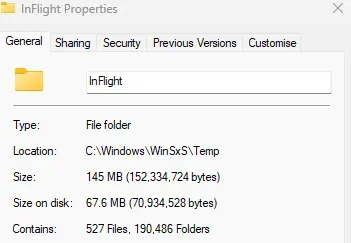
On my main system, that has arrived at W11 24H2 from an upgrade a long time ago from Windows 10, my inflight/temp directory looks like this

Screenshot 2025-06-24 134354.webp

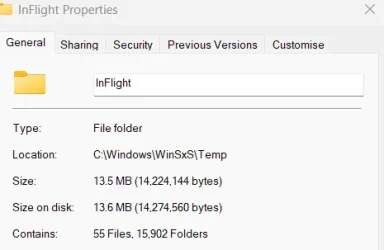
On the other hand, my Dell laptop that was clean-installed 6 months ago on 24H2 looks like this

Screenshot 2025-06-24 134417.webp


Quite a difference.
 

My Computers My Computers

  • At a glance

    Windows 11 Home 24H2 RPIntel I3-1010016 GBNvidia GT 1030
    OS
    Windows 11 Home 24H2 RP
    Computer type
    PC/Desktop
    Manufacturer/Model
    Self-build
    CPU
    Intel I3-10100
    Motherboard
    MSI H410M-PRO
    Memory
    16 GB
    Graphics Card(s)
    Nvidia GT 1030
    Sound Card
    Motherboard default
    Monitor(s) Displays
    Philips 27 inch
    Screen Resolution
    1920x1080
    Hard Drives
    Samsung EVO 970 NVMe SSD 256 Gb
    Samsung QVO 870 SATA SSD 2 Tb
    PSU
    ATX 450W
    Keyboard
    Logitech
    Mouse
    Logitech Wireless
    Internet Speed
    930 Mb down / 120 Mb up
    Browser
    Edge
    Antivirus
    Windows Defender
    Other Info
    Microsoft Office 2021 Plus
  • At a glance

    Windows 11 HomeIntel i3-810016 GbNvidia GT 720
    Operating System
    Windows 11 Home
    Computer type
    PC/Desktop
    Manufacturer/Model
    Self-build
    CPU
    Intel i3-8100
    Motherboard
    Gigabyte Z370 D3
    Memory
    16 Gb
    Graphics card(s)
    Nvidia GT 720
    Sound Card
    Motherboard default
    Monitor(s) Displays
    Philips 27-inch
    Screen Resolution
    1920x1080
    Hard Drives
    Samsung 960 NVMe SSD 256 Gb
    Seagate 2 Tb HDD
    PSU
    ATX 450W
    Keyboard
    Microsoft
    Mouse
    Logitech Wireless
    Internet Speed
    930 Mb down / 120 Mb up
    Browser
    Edge
    Antivirus
    Windows Defender

My Computers My Computers

  • At a glance

    All Branches but ReleaseAMD Ryzen 7 7735HS 3200-4500 Mhz 8 cores x 232 GB DDR5Radeon Graphic / NVIDIA GeForce RTX 4060 8 GB...
    OS
    All Branches but Release
    Computer type
    Laptop
    Manufacturer/Model
    Acer Nitro ANV15-51
    CPU
    AMD Ryzen 7 7735HS 3200-4500 Mhz 8 cores x 2
    Motherboard
    Sportage_RBH
    Memory
    32 GB DDR5
    Graphics Card(s)
    Radeon Graphic / NVIDIA GeForce RTX 4060 8 GB GDDR6
    Sound Card
    AMD/Realtek(R) Audio
    Monitor(s) Displays
    Integrated Monitor (15.3"vis)
    Screen Resolution
    FHD 1920X1080 16:9 144Hz
    Hard Drives
    KINGSTON OM8SEP4512Q-AA 1TB
    Western Digital 256GB
    PSU
    19V DC 6.32 A 120 W
    Cooling
    Dual Fans
    Mouse
    MS Bluetooth
    Internet Speed
    Fiber 1GB Cox -us & 1GB Orange-fr
    Browser
    Edge Canary- Firefox Nightly-Chrome Dev-Chrome Dev
    Antivirus
    Windows Defender
  • At a glance

    Windows 11 BetaAMD A9-94208 GB of DDR4AMD Radeon R5
    Operating System
    Windows 11 Beta
    Computer type
    Laptop
    Manufacturer/Model
    Asus X751BP
    CPU
    AMD A9-9420
    Memory
    8 GB of DDR4
    Graphics card(s)
    AMD Radeon R5
    Screen Resolution
    1600x900
    Hard Drives
    Seagate 1 TB
about 6,000 deleted on my Windows 11 ARM 64 sstem
 

My Computer My Computer

At a glance

Windows 11 ARM64Snapdragon(R) X 12-core X1E80100 @ 3.40 GHz 3...64.0 GB (63.5 GB usable)
OS
Windows 11 ARM64
Computer type
Laptop
Manufacturer/Model
Microsoft Surface Pro 11
CPU
Snapdragon(R) X 12-core X1E80100 @ 3.40 GHz 3.42 GHz
Memory
64.0 GB (63.5 GB usable)
Monitor(s) Displays
Surface laptop & Samsung 30"
Screen Resolution
1920 X 1080
Hard Drives
500 GB SSD
Case
Laptop
Keyboard
Logi
Mouse
Microsoft Comfort Mouse
Internet Speed
Download 24.39 Mb/s
Browser
Firefox & Edge
Antivirus
Malwarebytes
190,036 folders deleted on my 24H2 desktop running Release Preview. Took about 90 minutes to run.
 

My Computers My Computers

  • At a glance

    Windows 11 Home 24H2 RPIntel I3-1010016 GBNvidia GT 1030
    OS
    Windows 11 Home 24H2 RP
    Computer type
    PC/Desktop
    Manufacturer/Model
    Self-build
    CPU
    Intel I3-10100
    Motherboard
    MSI H410M-PRO
    Memory
    16 GB
    Graphics Card(s)
    Nvidia GT 1030
    Sound Card
    Motherboard default
    Monitor(s) Displays
    Philips 27 inch
    Screen Resolution
    1920x1080
    Hard Drives
    Samsung EVO 970 NVMe SSD 256 Gb
    Samsung QVO 870 SATA SSD 2 Tb
    PSU
    ATX 450W
    Keyboard
    Logitech
    Mouse
    Logitech Wireless
    Internet Speed
    930 Mb down / 120 Mb up
    Browser
    Edge
    Antivirus
    Windows Defender
    Other Info
    Microsoft Office 2021 Plus
  • At a glance

    Windows 11 HomeIntel i3-810016 GbNvidia GT 720
    Operating System
    Windows 11 Home
    Computer type
    PC/Desktop
    Manufacturer/Model
    Self-build
    CPU
    Intel i3-8100
    Motherboard
    Gigabyte Z370 D3
    Memory
    16 Gb
    Graphics card(s)
    Nvidia GT 720
    Sound Card
    Motherboard default
    Monitor(s) Displays
    Philips 27-inch
    Screen Resolution
    1920x1080
    Hard Drives
    Samsung 960 NVMe SSD 256 Gb
    Seagate 2 Tb HDD
    PSU
    ATX 450W
    Keyboard
    Microsoft
    Mouse
    Logitech Wireless
    Internet Speed
    930 Mb down / 120 Mb up
    Browser
    Edge
    Antivirus
    Windows Defender
about 6,000 deleted
The 6000 are actually ok, after each windows update there are about 3000to 6000empty folders. On some system they seem to be cleanup after a while.
But the 13,245 is at least 2 or 3 updates without a clean.
And especially the 190,036 empty foldes, is at least more then 2years without a clean.
 

My Computer My Computer

At a glance

Windows 11
OS
Windows 11
Computer type
PC/Desktop
And especially the 190,036 empty foldes, is at least more then 2years without a clean.

I do run regular cleanups though, so I don't know why there were so many. The other 3 W11 24H2 systems in our household have all been clean-installed in the last 6 months.
 

My Computers My Computers

  • At a glance

    Windows 11 Home 24H2 RPIntel I3-1010016 GBNvidia GT 1030
    OS
    Windows 11 Home 24H2 RP
    Computer type
    PC/Desktop
    Manufacturer/Model
    Self-build
    CPU
    Intel I3-10100
    Motherboard
    MSI H410M-PRO
    Memory
    16 GB
    Graphics Card(s)
    Nvidia GT 1030
    Sound Card
    Motherboard default
    Monitor(s) Displays
    Philips 27 inch
    Screen Resolution
    1920x1080
    Hard Drives
    Samsung EVO 970 NVMe SSD 256 Gb
    Samsung QVO 870 SATA SSD 2 Tb
    PSU
    ATX 450W
    Keyboard
    Logitech
    Mouse
    Logitech Wireless
    Internet Speed
    930 Mb down / 120 Mb up
    Browser
    Edge
    Antivirus
    Windows Defender
    Other Info
    Microsoft Office 2021 Plus
  • At a glance

    Windows 11 HomeIntel i3-810016 GbNvidia GT 720
    Operating System
    Windows 11 Home
    Computer type
    PC/Desktop
    Manufacturer/Model
    Self-build
    CPU
    Intel i3-8100
    Motherboard
    Gigabyte Z370 D3
    Memory
    16 Gb
    Graphics card(s)
    Nvidia GT 720
    Sound Card
    Motherboard default
    Monitor(s) Displays
    Philips 27-inch
    Screen Resolution
    1920x1080
    Hard Drives
    Samsung 960 NVMe SSD 256 Gb
    Seagate 2 Tb HDD
    PSU
    ATX 450W
    Keyboard
    Microsoft
    Mouse
    Logitech Wireless
    Internet Speed
    930 Mb down / 120 Mb up
    Browser
    Edge
    Antivirus
    Windows Defender
I do run regular cleanups though
Its not done by diskcleanup or any other manual interaction. Some process that is done by windows is responsible for cleaning it. But on some system it seems to be not doing that.
 

My Computer My Computer

At a glance

Windows 11
OS
Windows 11
Computer type
PC/Desktop
  • Like
Reactions: RFS
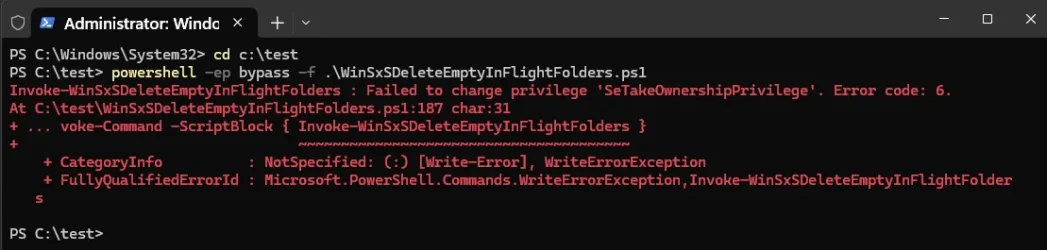
The script doesn't work for me. "Failed to change privilege"

1750795458539.webp

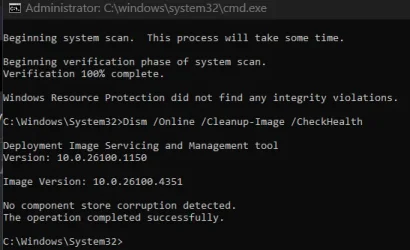
EDIT: Booted to a Linux Mint usb and cleared the entire InFlight directory. Computer seems fine.

1750797398736.webp
 
Last edited:

My Computers My Computers

  • At a glance

    Win 11 Pro 25H2 26200.8737Intel® Core™ i7-14700KG.SKILL Ripjaws S5 Series 64GB (2 x 32GB) DDR5ASUS GeForce RTX 4070 Super 12GB
    OS
    Win 11 Pro 25H2 26200.8737
    Computer type
    PC/Desktop
    Manufacturer/Model
    Self Built
    CPU
    Intel® Core™ i7-14700K
    Motherboard
    ASUS TUF Z690-PLUS WIFI BIOS 4505 11/29/25
    Memory
    G.SKILL Ripjaws S5 Series 64GB (2 x 32GB) DDR5
    Graphics Card(s)
    ASUS GeForce RTX 4070 Super 12GB
    Sound Card
    Sound Blaster AE-5 Plus
    Monitor(s) Displays
    ASUS TUF Gaming 27" 2K HDR Gaming
    Screen Resolution
    2560 x 1440
    Hard Drives
    Samsung 990 Pro 1TB NVMe (Win 11 25H2)
    SK hynix P41 500GB NVMe 25H2 DEV/Games
    SK hynix P41 2TB NVMe (x3)
    Crucial P3 Plus 4TB
    PSU
    Corsair RM850x Shift
    Case
    Antec Dark Phantom DP502 FLUX
    Cooling
    Corsair Nautilus 360 RS AIO
    Keyboard
    Logitech MK 320
    Mouse
    Razer Basilisk V3
    Internet Speed
    750Mbs
    Browser
    Firefox
    Antivirus
    Winows Security
    Other Info
    MR 8.1 Home
  • At a glance

    Win 11 Pro 25H2 26200.8737Intel Core i7-11700F64 GB DDR4MSI GeForce RTX 3060 Ventus 2X 12GB
    Operating System
    Win 11 Pro 25H2 26200.8737
    Computer type
    PC/Desktop
    Manufacturer/Model
    Self Built
    CPU
    Intel Core i7-11700F
    Motherboard
    Asus TUF Gaming Z590 Plus WiFi (BIOS 2803)
    Memory
    64 GB DDR4
    Graphics card(s)
    MSI GeForce RTX 3060 Ventus 2X 12GB
    Sound Card
    SoundBlaster Audigy Fx V2
    Monitor(s) Displays
    Samsung F27T350
    Screen Resolution
    1920x1080
    Hard Drives
    Samsung 980 Pro 1TB
    Samsung 970 EVO Plus 2TB
    Samsung 870 EVO 500GB SSD
    PSU
    Corsair HX750
    Case
    Cougar MX330-G Window
    Cooling
    Thermalright Frozen Edge 240 Black AIO
    Internet Speed
    350Mbps
    Browser
    Firefox
    Antivirus
    Windows Security
  • System Three
    Win 11 Pro 25H2 26200.8737
    ASUS PRIME Z370-P II BIOS 3004 7/12/21
    Intel Core i7-8700 CPU @ 3.20GHz
    32GB DDR4 RAM (4x8)
    iGPU Intel UHD Graphics 630
    Mid-Tower Desktop
Have not seen that error code before, What happend if you run the command again? Even now you have emptyed the folder. However if it does work a second attempt, i might have an idea where the issue originates from.
 
Last edited:

My Computer My Computer

At a glance

Windows 11
OS
Windows 11
Computer type
PC/Desktop
Have not seen that error code before, What happend if you run the command again? Even now you have emptyed the folder. However if it does work a second attempt, i might have an idea where the issue originates from.

Just tried this on the wife's PC and get the same error

Screenshot 2025-06-24 221758.webp
 

My Computers My Computers

  • At a glance

    Windows 11 Home 24H2 RPIntel I3-1010016 GBNvidia GT 1030
    OS
    Windows 11 Home 24H2 RP
    Computer type
    PC/Desktop
    Manufacturer/Model
    Self-build
    CPU
    Intel I3-10100
    Motherboard
    MSI H410M-PRO
    Memory
    16 GB
    Graphics Card(s)
    Nvidia GT 1030
    Sound Card
    Motherboard default
    Monitor(s) Displays
    Philips 27 inch
    Screen Resolution
    1920x1080
    Hard Drives
    Samsung EVO 970 NVMe SSD 256 Gb
    Samsung QVO 870 SATA SSD 2 Tb
    PSU
    ATX 450W
    Keyboard
    Logitech
    Mouse
    Logitech Wireless
    Internet Speed
    930 Mb down / 120 Mb up
    Browser
    Edge
    Antivirus
    Windows Defender
    Other Info
    Microsoft Office 2021 Plus
  • At a glance

    Windows 11 HomeIntel i3-810016 GbNvidia GT 720
    Operating System
    Windows 11 Home
    Computer type
    PC/Desktop
    Manufacturer/Model
    Self-build
    CPU
    Intel i3-8100
    Motherboard
    Gigabyte Z370 D3
    Memory
    16 Gb
    Graphics card(s)
    Nvidia GT 720
    Sound Card
    Motherboard default
    Monitor(s) Displays
    Philips 27-inch
    Screen Resolution
    1920x1080
    Hard Drives
    Samsung 960 NVMe SSD 256 Gb
    Seagate 2 Tb HDD
    PSU
    ATX 450W
    Keyboard
    Microsoft
    Mouse
    Logitech Wireless
    Internet Speed
    930 Mb down / 120 Mb up
    Browser
    Edge
    Antivirus
    Windows Defender
Out of curiousity, have you changed any UAC settings?
 

My Computer My Computer

At a glance

Windows 7
OS
Windows 7
Out of curiousity, have you changed any UAC settings?
I haven't no, The script worked on my desktop which has arrived at 24H2 from a W10 base. The wife's PC howver was clean-installed with 24H2 about 9 months ago.

Going to try on my Dell laptop which is also a 24H2 clean install.
 

My Computers My Computers

  • At a glance

    Windows 11 Home 24H2 RPIntel I3-1010016 GBNvidia GT 1030
    OS
    Windows 11 Home 24H2 RP
    Computer type
    PC/Desktop
    Manufacturer/Model
    Self-build
    CPU
    Intel I3-10100
    Motherboard
    MSI H410M-PRO
    Memory
    16 GB
    Graphics Card(s)
    Nvidia GT 1030
    Sound Card
    Motherboard default
    Monitor(s) Displays
    Philips 27 inch
    Screen Resolution
    1920x1080
    Hard Drives
    Samsung EVO 970 NVMe SSD 256 Gb
    Samsung QVO 870 SATA SSD 2 Tb
    PSU
    ATX 450W
    Keyboard
    Logitech
    Mouse
    Logitech Wireless
    Internet Speed
    930 Mb down / 120 Mb up
    Browser
    Edge
    Antivirus
    Windows Defender
    Other Info
    Microsoft Office 2021 Plus
  • At a glance

    Windows 11 HomeIntel i3-810016 GbNvidia GT 720
    Operating System
    Windows 11 Home
    Computer type
    PC/Desktop
    Manufacturer/Model
    Self-build
    CPU
    Intel i3-8100
    Motherboard
    Gigabyte Z370 D3
    Memory
    16 Gb
    Graphics card(s)
    Nvidia GT 720
    Sound Card
    Motherboard default
    Monitor(s) Displays
    Philips 27-inch
    Screen Resolution
    1920x1080
    Hard Drives
    Samsung 960 NVMe SSD 256 Gb
    Seagate 2 Tb HDD
    PSU
    ATX 450W
    Keyboard
    Microsoft
    Mouse
    Logitech Wireless
    Internet Speed
    930 Mb down / 120 Mb up
    Browser
    Edge
    Antivirus
    Windows Defender
Can you check:
  • Run secpol.msc
  • Go to Local Policies → User Rights Assignment
  • Check “Take ownership of files or other objects” for your account

Administrators should be in the list.

If you update the policy, restart might be needed.
 

My Computer My Computer

At a glance

Windows 11
OS
Windows 11
Computer type
PC/Desktop
Can you check:
  • Run secpol.msc
  • Go to Local Policies → User Rights Assignment
  • Check “Take ownership of files or other objects” for your account

Administrators should be in the list.

On her PC there's an "admin" user so I tried that, and it still fails. So logged back on to her account and tried once more, and it worked! Her PC is a 24H2 clean-install but it has 85,000+ directories.

Laptop worked first time.

PCs are Windows home so secpol.msc does not work.
 

My Computers My Computers

  • At a glance

    Windows 11 Home 24H2 RPIntel I3-1010016 GBNvidia GT 1030
    OS
    Windows 11 Home 24H2 RP
    Computer type
    PC/Desktop
    Manufacturer/Model
    Self-build
    CPU
    Intel I3-10100
    Motherboard
    MSI H410M-PRO
    Memory
    16 GB
    Graphics Card(s)
    Nvidia GT 1030
    Sound Card
    Motherboard default
    Monitor(s) Displays
    Philips 27 inch
    Screen Resolution
    1920x1080
    Hard Drives
    Samsung EVO 970 NVMe SSD 256 Gb
    Samsung QVO 870 SATA SSD 2 Tb
    PSU
    ATX 450W
    Keyboard
    Logitech
    Mouse
    Logitech Wireless
    Internet Speed
    930 Mb down / 120 Mb up
    Browser
    Edge
    Antivirus
    Windows Defender
    Other Info
    Microsoft Office 2021 Plus
  • At a glance

    Windows 11 HomeIntel i3-810016 GbNvidia GT 720
    Operating System
    Windows 11 Home
    Computer type
    PC/Desktop
    Manufacturer/Model
    Self-build
    CPU
    Intel i3-8100
    Motherboard
    Gigabyte Z370 D3
    Memory
    16 Gb
    Graphics card(s)
    Nvidia GT 720
    Sound Card
    Motherboard default
    Monitor(s) Displays
    Philips 27-inch
    Screen Resolution
    1920x1080
    Hard Drives
    Samsung 960 NVMe SSD 256 Gb
    Seagate 2 Tb HDD
    PSU
    ATX 450W
    Keyboard
    Microsoft
    Mouse
    Logitech Wireless
    Internet Speed
    930 Mb down / 120 Mb up
    Browser
    Edge
    Antivirus
    Windows Defender
For what it's worth, I don't change the ownership on these folders. I just make sure the admins group has full control.


Powershell:
function Set-FolderPermission
{
    <#
    .SYNOPSIS
    Sets the permissions on the given folder.

    .DESCRIPTION
    The folder permissions are set such that Administrators have Full Control.
    Other permissions remain intact.

    .PARAMETER Path
    The path of the folder whose permissions are who be set.

    .EXAMPLE
    Set-FolderPermission -Path 'C:\Foo\Bar'
    #>
    [CmdletBinding()]
    param (
        [Parameter()]
        [string]
        $Path
    )

    # Get a reference to the well-known SID for the local administrators group.
    [Security.Principal.SecurityIdentifier]$adminsSid = [Security.Principal.SecurityIdentifier]::new(([Security.Principal.WellKnownSidType]::BuiltinAdministratorsSid), $null)

    $folderAcl = Get-Acl -Path $Path
    $folderAcl.SetAccessRuleProtection($true, $true)
    Set-Acl -Path $Path -AclObject $folderAcl

    # Get the list of access rules from the ACL, so we can remove and modify some of them.
    $folderAcl = Get-Acl -Path $Path
    [Security.AccessControl.AuthorizationRuleCollection]$accessRules = $folderAcl.GetAccessRules($true, $false, [Security.Principal.SecurityIdentifier])

    [bool]$aclModified = $false
    for ([int]$i = 0; $i -lt $accessRules.Count; $i++)
    {
        # If the access rule belongs to Administrators...
        if ($accessRules[$i].IdentityReference -eq $adminsSid)
        {
            # ... and the permissions are not Full Control, set them to Full Control.
            if (([Security.AccessControl.FileSystemAccessRule]$accessRules[$i]).FileSystemRights -ne ([Security.AccessControl.FileSystemRights]::FullControl))
            {
                [bool]$modified = $false
                [Security.AccessControl.FileSystemAccessRule]$adminsAccessRule = [Security.AccessControl.FileSystemAccessRule]::new(
                    $adminsSid,
                    [Security.AccessControl.FileSystemRights]::FullControl,
                    [Security.AccessControl.InheritanceFlags]::ContainerInherit -bor [Security.AccessControl.InheritanceFlags]::ObjectInherit,
                    [Security.AccessControl.PropagationFlags]::None,
                    [Security.AccessControl.AccessControlType]::Allow)
                [bool]$successful = $folderAcl.ModifyAccessRule([System.Security.AccessControl.AccessControlModification]::Reset, $adminsAccessRule, [ref]$modified)
                $aclModified = $aclModified -or $modified
            }
        }
    }

    # If the ACL was modified in the above loop, set the ACL on the installation folder.
    if ($aclModified)
    {
        Set-Acl -Path $Path -AclObject $folderAcl
    }
}

 

My Computer My Computer

At a glance

Windows 11 Pro 25H212th Gen Core i7-1260P64 GB Micron PC4-25600Intel Iris Xe Graphics
OS
Windows 11 Pro 25H2
Computer type
PC/Desktop
Manufacturer/Model
Intel NUC12WSHi7
CPU
12th Gen Core i7-1260P
Motherboard
NUC12WSBi7
Memory
64 GB Micron PC4-25600
Graphics Card(s)
Intel Iris Xe Graphics
Sound Card
on-board Realtek HD Audio
Monitor(s) Displays
Dell U3219Q
Screen Resolution
3840 x 2160
Hard Drives
Samsung SSD 990 PRO 1TB
Crucial MX500 2 TB
Antivirus
Microsoft Defender
Back
Top Bottom